格盘忘记备份笔记了
如题,没备份,那咋办嘛,数据恢复工具也没扫出来,只能说是格的非常干净了
想到有个静态存储库,想着用工具恢复看看
网上确实有个工具,但是是七年前写的,太辣了,根本用不了,就拷打cursor写了个,恢复的效果还不错
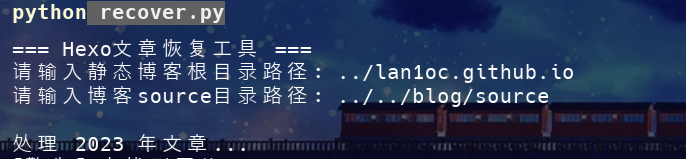
恢复后的文章基本保留了我原有的Front-matte
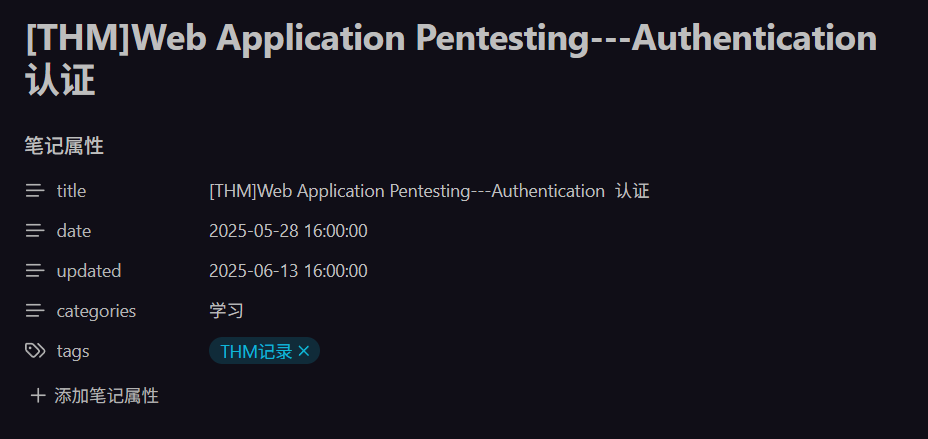
就是时间啥的可能有点问题,毕竟主要是根据静态存储库恢复的
嗯稍微研究下了配置项
之前为了文章排序的问题,是自己改了主题渲染模板以及写了个js脚本辅助,date: 2025-04-01 16:00:00 updated: 2025-08-14 categories: 学习 tags: - 日常随记 --- # updated判断 在hexo目录下创建脚本文件`scripts/custom-i 这记录了,但刚恢复,不想那么麻烦,研究了下配置项,发现。。。。。。本来就有的,设置为updated就行
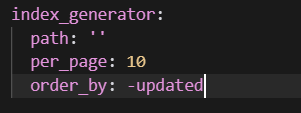

md还是要写插件,要不然就会出现updated的值相同,但是date的值在更早的文章会排在上面,还是要用到date: 2025-04-01 16:00:00 updated: 2025-08-14 categories: 学习 tags: - 日常随记 --- # updated判断 在hexo目录下创建脚本文件`scripts/custom-i 这里写的插件,但是主题渲染模板不需要修改
解决了相对链接问题
恢复的文章中有很多相对路径的内部链接,比如 [这](../笔记/笔记4---修改了主题模板,增加了updated判断),但是在 Hexo 中,文章的 URL 是根据 permalink 配置生成的(如 :year/:month/:day/:title/),而不是按照文件夹结构,所以这种相对路径链接会失效。
问题分析
Hexo 的 URL 结构:配置 permalink: :year/:month/:day/:title/ 会将文章转换为类似 /2025/04/01/笔记4---修改了主题模板,增加了updated判断/ 的URL- 相对路径问题:
../笔记/笔记4---修改了主题模板,增加了updated判断 这种文件系统路径在网页中无效
- 错误的拼接:浏览器会将当前文章的URL与相对路径拼接,导致错误的路径
解决方案:自动转换插件
写了一个Hexo 插件来自动将相对路径链接转换为正确的 {% post_link %} 标签,这样在本地写作时依然可以使用自然的相对路径,插件会在构建时自动处理。
创建文件 scripts/relative-link-converter.js:
1
2
3
4
5
6
7
8
9
10
11
12
13
14
15
16
17
18
19
20
21
22
23
24
25
26
27
28
29
30
31
32
33
34
35
36
37
38
39
40
41
42
43
44
45
46
47
48
49
50
51
52
53
54
55
56
57
58
59
60
61
62
63
64
65
66
67
68
69
70
71
72
73
74
75
76
77
78
79
80
81
82
83
84
85
86
87
88
89
90
91
92
93
94
95
96
97
98
99
100
101
102
103
104
105
106
107
108
109
110
111
112
113
114
115
116
117
118
119
120
121
122
123
124
125
126
127
128
129
130
131
132
133
134
135
136
137
138
139
140
141
142
143
144
145
146
147
148
149
150
151
152
153
|
'use strict';
const fs = require('fs');
const path = require('path');
let allPosts = null;
function scanAllPosts() {
if (allPosts) return allPosts;
allPosts = new Map();
const postsDir = path.join(hexo.source_dir, '_posts');
function scanDir(dir) {
try {
const items = fs.readdirSync(dir);
items.forEach(item => {
const fullPath = path.join(dir, item);
const stat = fs.statSync(fullPath);
if (stat.isDirectory()) {
scanDir(fullPath);
} else if (item.endsWith('.md')) {
try {
const content = fs.readFileSync(fullPath, 'utf8');
const titleMatch = content.match(/^title:\s*["']?([^"'\\n]+)["']?/m);
if (titleMatch) {
const title = titleMatch[1].trim();
const filename = path.basename(item, '.md');
allPosts.set(title, title);
allPosts.set(filename, title);
}
} catch (e) {
console.warn(`[相对链接扫描] 读取文件失败: ${fullPath}`, e.message);
}
}
});
} catch (e) {
console.warn(`[相对链接扫描] 扫描目录失败: ${dir}`, e.message);
}
}
scanDir(postsDir);
console.log(`[相对链接扫描] 扫描完成,找到 ${allPosts.size / 2} 篇文章`);
console.log(`[相对链接扫描] 可用的文章标题:`, Array.from(new Set(Array.from(allPosts.values()))));
return allPosts;
}
function protectCodeBlocks(content) {
const codeBlocks = [];
content = content.replace(/```[\s\S]*?```/g, match => {
codeBlocks.push(match);
return `__CODE_BLOCK_${codeBlocks.length - 1}__`;
});
const inlineCodes = [];
content = content.replace(/`[^`]+`/g, match => {
inlineCodes.push(match);
return `__INLINE_CODE_${inlineCodes.length - 1}__`;
});
return { content, codeBlocks, inlineCodes };
}
function restoreCodeBlocks(content, codeBlocks, inlineCodes) {
content = content.replace(/__CODE_BLOCK_(\d+)__/g, (m, i) => codeBlocks[Number(i)]);
content = content.replace(/__INLINE_CODE_(\d+)__/g, (m, i) => inlineCodes[Number(i)]);
return content;
}
hexo.extend.filter.register('before_post_render', function(data) {
if (!data.source || !data.source.endsWith('.md')) return data;
const { content: protectedContent, codeBlocks, inlineCodes } = protectCodeBlocks(data.content);
const relativeLinkRegex = /\[([^\]]+)\]\(\.\.\/[^)]+\/([^/)]+)\)/g;
const matches = protectedContent.match(relativeLinkRegex);
if (!matches) {
data.content = restoreCodeBlocks(protectedContent, codeBlocks, inlineCodes);
return data;
}
const titleMap = scanAllPosts();
console.log(`[相对链接检测] 在 ${data.source} 中找到 ${matches.length} 个相对链接:`, matches);
let replaced = protectedContent.replace(relativeLinkRegex, (match, linkText, filename) => {
const cleanFilename = filename.replace(/\.(md|html)$/, '');
console.log(`[相对链接处理] 处理链接: ${match}, 提取的文件名: "${cleanFilename}"`);
let targetPost = null;
if (titleMap.has(cleanFilename)) {
targetPost = titleMap.get(cleanFilename);
console.log(`[相对链接处理] 精确匹配成功: "${cleanFilename}" -> "${targetPost}"`);
}
if (!targetPost) {
const normalizedFilename = cleanFilename
.replace(/[^\w\u4e00-\u9fff]/g, '')
.toLowerCase();
console.log(`[相对链接处理] 尝试模糊匹配,标准化文件名: "${normalizedFilename}"`);
for (const [key, title] of titleMap) {
const normalizedKey = key
.replace(/[^\w\u4e00-\u9fff]/g, '')
.toLowerCase();
if (normalizedKey === normalizedFilename) {
targetPost = title;
console.log(`[相对链接处理] 模糊匹配成功: "${normalizedFilename}" -> "${title}"`);
break;
}
}
}
if (targetPost) {
console.log(`[相对链接转换] ${match} -> {% post_link ${targetPost} ${linkText} %}`);
return `{% post_link ${targetPost} ${linkText} %}`;
} else {
console.warn(`[相对链接转换] 警告: 无法找到对应文章 "${cleanFilename}"`);
return match;
}
});
data.content = restoreCodeBlocks(replaced, codeBlocks, inlineCodes);
return data;
});
console.log('[插件加载] 相对链接自动转换插件已激活');
|
这样,文章中用类似 [这](../笔记/xxx) 或放在多行代码块里的内容都不会被自动替换,展示和写作都更自然了。
嗯没啥好说,只能说,多留备份吧



![[记录]尝试shiro有key无链利用,但失败](/img/c1/3.webp)